
Base64编码与解码原理和使用及复杂数据的存储
Base64是网络上最常用的传输8bit字节数据的编码方式之一,是一种简单的加密方式,实际中使用的加密比这复杂的多,也可以用在复杂数据的存储上,比如我们要把类对象和图片等复杂数据进行存储,就需要将这些对象和图片的字节数据进行Base64编码,然后再讲编码后的String存储到XML文件中。
我们先来简单的了解Base64的原理:3*8=4*6
例子:s13
首先将其转换成ASCII后对应的是:115 49 51 ,这3个数字的二进制是01110011 00110001 00110011,
然后6个为一组(共4组):011100 110011 000100 110011,再将每组高位补全为8个得到:00011100 00110011 00000100 00110011,得到这4组二进制数对应的 十进制:28 51 4 51 ,最后根据这4个数字到表(这个表格百度可以找到)中其所对应的值:c z E z,那么就得到了经过Base64编码后的数据。
关于Base64的代码实现在后面我会给出,现在我们来看一下Android中Base64的使用方法。
在网上找到关于Base64的文章很少,所以就自己看了Android源码做出下面的总结,如有错误地方请指出。我们来看一下Andorid中提供给我们可以使用的Base64函数的编码。
public class Base64{
   public static final int DEFAULT=0;  //下面6个静态全局变量是编码和解码时的标示,我们一般使用第一个
   public static final int NO_PADDING=1;
   public static final int NO_WRAP=2;
   public static final int CRLF=4;
   public static final int URL_SAFE=8;
   public static final int NO_CLOSE=16;

   ...

   //下面是我们在编码时常调用的函数,均为静态函数

   /**
    *   编码核心函数
    *   参数input:要进行编码的字符串的字节数组
    *   参数offset:开始编码位置的偏移值,一般为0
    *   参数len: 要编码的字节数组的长度
    *   参数flags: 编码的标示,一般为DEFAULT
    *   返回值为编码后得到的字节数组
    */
   public static byte[] encode(byte[] input,int offset,int len,int flags){
   ...
   }

   public static byte[] encode(byte[] input,int flags){
      return encode(input,0,input.length,flags);//调用第一个函数
   }

   //调用第二个函数,并将其结果封装成字符串形式
   public static String encodeToString(byte[] input,int flags){
      try{
	     return new String(encode(input,flags),"US-ASCII");
	  }catch(UnsupportEncodingException e){
	     throw new AssertionError(e);
	  }
   }

   //对第二个函数进行了封装,将原来返回的字节数组封装成字符串
   public static String encodeToString(byte[] input,int flags){
      try{
      return new String(encode(input,flags),"US-ASCII");
  }catch(UnsupportedEncodingException e){
      throw new AssertionError(e);
  }
   }
   ......
}
Base64类提供了四个编码函数,其他三个最终都会调用encode(byte[] input,int offset,int len,int flags)。因为我们在使用时有两种需求:返回字节数组被编码后得到的字符串和返回字节数组被编码后得到字节数组。encode函数返回字节数组被编码后得到的字节数组,encodeToString内部调用了encode, 并将返回的字节数组转换成字符串。
下面来看看关于解码的函数:
public static byte[] decode(String str,int flags){
      return decode(str.getBytes(),flags);//调用下面那个函数
   }

   public static byte[] decode(byte[] input,int flags){
       return decode(input,0,input.length,flags);//调用下面那个函数
   }

   /**
    * 在编码时最终都调用该函数
	*  参数input:要编码字符串的字节数组
	*  参数offset:开始编码位置的偏移值
	*  参数len:编码数组的长度
	*  参数flag:6个标示之一,一般为DEFAULT
	*/
   public static byte[] decode(byte[] input,int offset,int len,int flags{
    ...
   }
解码函数的类型和使用与编码函数类似,我就不再赘述了。
对于在本文开头所举的例子:s13进行编码后得到czEz的代码实现如下:
String s="s13";
String str=Base64.encodeToString(s.getBytes(), 0);
得到的str值为czEz。
那么对czEz进行解码操作后就能得到s13了。
String s="s13";
String str_encode=Base64.encodeToString(s.getBytes(), 0);
byte[] byteDecode=Base64.decode(str_encode, 0);
String str_decode=new String(byteDecode);
得到的str_decode的值就为s13,在断点调试时就会发现字节数组byteDecode中值为[ 115,49,51],刚好就是s13的ASCII值。我们只需用String转换一下即可。
上面分析了Android内置的Base64编码和解码,但是其只提供了简单的字符串或字节数组的编解码,我们在项目开发中就会发现时我们的需求是多种多样的,如果使用内置的Base64会导致项目中代码过多,所以我们一般自己实现Base64加解码,自定义很多方法。我会单独写一篇博客来讲解实现自定义的Base64。
下面我们在项目中来使用Base64来实现复杂数据的存取,这里是使用SharedPreferences来存取的,SharedPreferences是最简单的存取方式,只能用于存放key-value对,一般我们只用于存取int,String等基本类型,这里我们通过将复杂数据类型,比如类对象和图片,进行编码后再以键值对的形式存储。
先看一下实现的效果: 1. 将两个编辑框中的数据赋值给类对象然后进行编码后存储起来,再解码后显示出来;
2.将图上的红点图像编码保存,再解码显示到底部的安卓头像上。
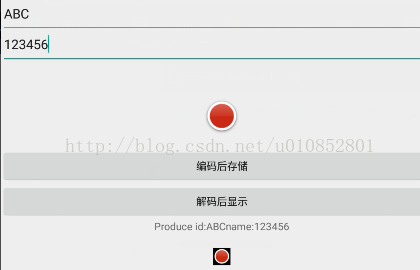
我们的要存储的类,需要序列化:
import java.io.Serializable;

public class Produce implements Serializable{
	private String id;
	private String name;

	public void setId(String id){
		this.id=id;
	}
	public void setName(String name){
		this.name=name;
	}

	public String getId(){
		return id;
	}

	public String getName(){
		return name;
	}

}点击“编码后存储”按钮时:String str1=edit1.getText().toString();
String str2=edit2.getText().toString();
if(!str1.equals(null)&&!str2.equals(null)){
Produce pro=new Produce();
pro.setId(str1);
pro.setName(str2);
//对Produce对象进行Base64编码
ByteArrayOutputStream baos=new ByteArrayOutputStream();
try {
//对类对象pro编码后存储
ObjectOutputStream oos=new ObjectOutputStream(baos);
oos.writeObject(pro);//将对象写到字节数组流中的
String encodeStr=Base64.encodeToString(baos.toByteArray(), 0);//编码
mySharedPreferences=getSharedPreferences("base64",Activity.MODE_PRIVATE);
SharedPreferences.Editor editor=mySharedPreferences.edit();
editor.putString("produce", encodeStr);
editor.commit();
} catch (IOException e) {
e.printStackTrace();
}
}当点击“解码显示”按钮时:String produceBase64=mySharedPreferences.getString("produce", "");
if(!produceBase64.equals("")){
//解码显示
byte[] strDecode=Base64.decode(produceBase64, 0);
ByteArrayInputStream bais=new ByteArrayInputStream(strDecode);
try {
ObjectInputStream ois=new ObjectInputStream(bais);
//从ObjectInputStream 中读取Produce对象
try {
Produce pro=(Produce)ois.readObject();
text.setText("Produce id:"+pro.getId()+"name:"+pro.getName());
} catch (ClassNotFoundException e) {
e.printStackTrace();
}
} catch (StreamCorruptedException e) {
e.printStackTrace();
} catch (IOException e) {
e.printStackTrace();
}}对图片的编码,压缩,存储过程如下:
ByteArrayOutputStream baos1=new ByteArrayOutputStream();
((BitmapDrawable)image1.getDrawable()).getBitmap().compress(CompressFormat.JPEG, 50, baos1);
String encodeBitmap=Base64.encodeToString(baos1.toByteArray(), 0);
editor.putString("Bitmap", encodeBitmap);
editor.commit();解码并显示出来:ByteArrayInputStream array=new ByteArrayInputStream(Base64.decode(decodeBitmap, 0)); image2.setImageDrawable(Drawable.createFromStream(array, "image_name"));由于时间问题,完成比较仓促。
- 上一篇:没有了
- 下一篇:没有了
