
基于ThinkPHP3.2.3后台登录界面学习记录(二)
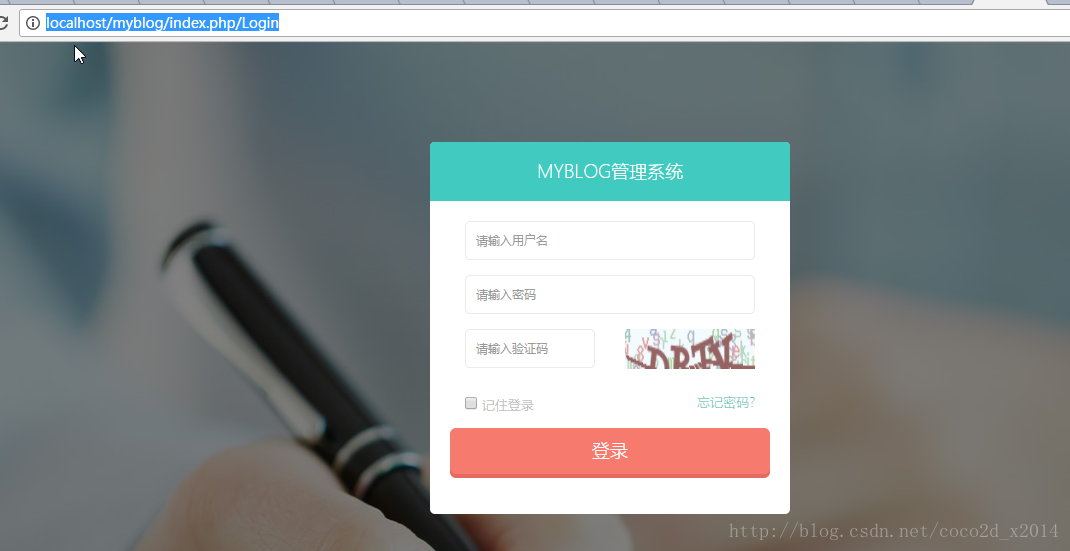
先看效果图 基于ThinkPHP3.2.3后台登录界面
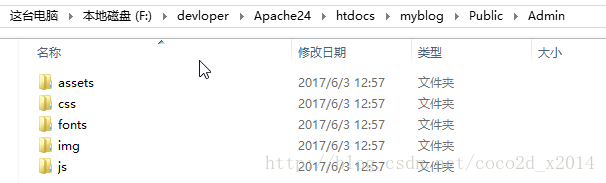
把静态资源导入 到Public目录下
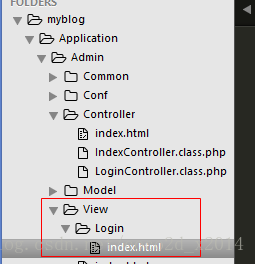
创建Login控制器 并编辑如下内容
<?php
namespace AdminController;

use ThinkVerify;
use ThinkController;
class LoginController extends Controller {
    public function index(){
        $this->display();
    }
  }
然后在View目录新建一目录Login 里面建一index.html文件 内如如下
<!DOCTYPE html>
<html lang="zh-cn">
<head>
<meta charset="utf-8">
<meta name="viewport" content="width=device-width, initial-scale=1.0">
<meta name="description" content="">
<meta name="author" content="Mosaddek">
<meta name="keyword" content="FlatLab, Dashboard, Bootstrap, Admin, Template, Theme, Responsive, Fluid, Retina">
<link rel="shortcut icon" href="img/favicon.png">
<title>后台用户登录</title>
<!-- Bootstrap core CSS -->
<link href="/myblog__ADMIN__/css/bootstrap.min.css" rel="stylesheet">
<link href="/myblog__ADMIN__/css/bootstrap-reset.css" rel="stylesheet">
<!--external css-->
<link href="/myblog__ADMIN__/assets/font-awesome/css/font-awesome.css" rel="stylesheet" />
<!-- Custom styles for this template -->
<link href="/myblog__ADMIN__/css/style.css" rel="stylesheet">
<link href="/myblog__ADMIN__/css/style-responsive.css" rel="stylesheet" />
<!-- HTML5 shim and Respond.js IE8 support of HTML5 tooltipss and media queries -->
<!--[if lt IE 9]>
<script src="__ADMIN__/js/html5shiv.js"></script>
<script src="__ADMIN__/js/respond.min.js"></script>
<![endif]-->
</head>
<body class="login-body">
<div class="container">
<form id="admin_login" class="form-signin" action="{:U("Admin/Login/index")}" method="post">
<h2 class="form-signin-heading">myblog管理系统</h2>
<div class="login-wrap">
<div class="col-lg-12">
<input name="username" type="text" class="form-control" placeholder="请输入用户名" autofocus autocomplete="off">
</div>
<div class="col-lg-12">
<input name="password" type="password" class="form-control" placeholder="请输入密码" autocomplete="off">
</div>
<div class="col-lg-6">
<input name="verify_img" type="text" class="form-control " placeholder="请输入验证码" autocomplete="off">
</div>
<div class="col-lg-6">
<img src="{:U("Login/verify",array())}" id="verify_img_src" width="100%" height="40" alt="点击刷新" title="点击刷新">
</div>
<div class="col-lg-12">
<label class="checkbox">
<input type="checkbox" value="remember"> 记住登录
<span class="pull-right">
<a data-toggle="modal" href="#forgot"> 忘记密码?</a>
</span>
</label>
</div>
<button class="btn btn-lg btn-login btn-block" type="submit">登录</button>
</div>
</form>
</div>
<!-- Modal -->
<div id="forgot" aria-hidden="true" aria-labelledby="myModalLabel" role="dialog" tabindex="-1" class="modal fade">
<div class="modal-dialog">
<div class="modal-content">
<div class="modal-header">
<button type="button" class="close" data-dismiss="modal" aria-hidden="true">×</button>
<h4 class="modal-title">忘记密码?</h4>
</div>
<div class="modal-body">
<p>请输入你的邮箱,重置登录密码</p>
<input type="text" name="email" placeholder="邮箱地址" autocomplete="off" class="form-control placeholder-no-fix">
</div>
<div class="modal-footer">
<button data-dismiss="modal" class="btn btn-default" type="button">取消</button>
<button class="btn btn-success" type="button">发送</button>
</div>
</div>
</div>
</div>
<!-- modal -->
<script src="/myblog__ADMIN__/js/jquery.js"></script>
<script src="/myblog__ADMIN__/js/bootstrap.min.js"></script>
<script src="/myblog__ADMIN__/js/jquery.form.min.js"></script>
<script>
$("#admin_login").ajaxForm({
//验证数据
beforeSubmit:function(){
$(".btn-login").text("登陆中...");
},
dataType: "json",
success:function(data){
$(".btn-login").text("登录");
if(data.status==100){
if(data.url){
alert("登录成功");
setTimeout("window.location.href ="" + data.url + """,500);
}
}
else{
//刷新验证码
$("#verify_img_src").trigger("click");
alert(data.msg);
}
}
});
//验证码切换
$("#verify_img_src").click(function(){
//var verify_url = "{:U("Login/verify")}";
var verify_url = "Login/verify";
var t = Math.random();
$(this).attr("src",verify_url+"/t="+t);
});
</script>
</body>
</html>
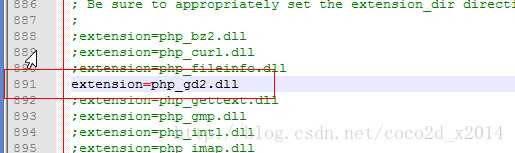
而后关于验证码 首先你需要PHP开启gd2的支持 打开php.ini文件
再次编辑Login控制类 增加生成验证码方法
//生成验证码
    public function verify(){
        $config=[
           "fontSize" =>19,//验证码字体大小
           "length" =>4,//验证码位数
           "imageH" =>24
        ];
        /*$config = array("expire"=>2400, "length" => 4,"useCurve"=>false,
            "codeSet"=>"123456789");*/
        ob_end_clean();
        $verify2=new Verify($config);
        $verify2->entry();
    }

    //验证码校验
    public function check_verify($code,$id=""){
        $verify=new Verify();
        $res=$verify->check($code,$id);
        $this->ajaxReturn($res,"json");
    }
声明:该文观点仅代表作者本人,入门客AI创业平台信息发布平台仅提供信息存储空间服务,如有疑问请联系rumenke@qq.com。
- 上一篇:没有了
- 下一篇:没有了
