
java后台产生验证码后台验证
直接跳severlet在java后台生成验证码:
@RequestMapping(value="yzm.action")
	public void Yzm(HttpSession session,HttpServletResponse resp){
		// 验证码图片的宽度。
	     int width = 60;

	    // 验证码图片的高度。
	     int height = 20;

	    // 验证码字符个数
	     int codeCount = 4;

	     int x = 0;

	    // 字体高度
	     int fontHeight;

	     int codeY;

	    char[] codeSequence = { "A", "B", "C", "D", "E", "F", "G", "H", "I", "J",
	            "K", "L", "M", "N", "O", "P", "Q", "R", "S", "T", "U", "V", "W",
	            "X", "Y", "Z", "0", "1", "2", "3", "4", "5", "6", "7", "8", "9" };
	    x = width / (codeCount + 1);
        fontHeight = height - 2;
        codeY = height - 4;
        BufferedImage buffImg = new BufferedImage(width, height,
                BufferedImage.TYPE_INT_RGB);
        Graphics2D g = buffImg.createGraphics();

        // 创建一个随机数生成器类
        Random random = new Random();

        // 将图像填充为白色
        g.setColor(Color.WHITE);
        g.fillRect(0, 0, width, height);

        // 创建字体,字体的大小应该根据图片的高度来定。
        Font font = new Font("Fixedsys", Font.PLAIN, fontHeight);
        // 设置字体。
        g.setFont(font);

        // 画边框。
//        g.setColor(Color.BLACK);
//        g.drawRect(0, 0, width - 1, height - 1);

        // 随机产生160条干扰线,使图象中的认证码不易被其它程序探测到。
        g.setColor(Color.BLACK);
        for (int i = 0; i < 1; i++) {
            int x2 = random.nextInt(width);
            int y2 = random.nextInt(height);
            int xl = random.nextInt(12);
            int yl = random.nextInt(12);
            g.drawLine(x2, y2, x + xl, y2 + yl);
        }

        // randomCode用于保存随机产生的验证码,以便用户登录后进行验证。
        StringBuffer randomCode = new StringBuffer();

        int red = 0, green = 0, blue = 0;

        // 随机产生codeCount数字的验证码。
        for (int i = 0; i < codeCount; i++) {
            // 得到随机产生的验证码数字。
            String strRand = String.valueOf(codeSequence[random.nextInt(36)]);
            // 产生随机的颜色分量来构造颜色值,这样输出的每位数字的颜色值都将不同。
            red = random.nextInt(255);
            green = random.nextInt(255);
            blue = random.nextInt(255);

            // 用随机产生的颜色将验证码绘制到图像中。
            g.setColor(new Color(red, green, blue));
            g.drawString(strRand, (i + 1) * x, codeY);

            // 将产生的四个随机数组合在一起。
            randomCode.append(strRand);
        }
        // 将四位数字的验证码保存到Session中。
        session.setAttribute("validateCode", randomCode.toString());
        ServletOutputStream sos;
		try {
			sos = resp.getOutputStream();
			ImageIO.write(buffImg, "jpeg", sos);
			sos.close();
		} catch (IOException e) {
			// TODO Auto-generated catch block
			e.printStackTrace();
		}
	}
jsp显示页面的代码,点击图片刷新
<td><img id="img" src="yzm.action"/>${validateCode}</td>
           <td><input type="text" name="yzma"/><br/></td>
$("#img").click(function(){
$(this).attr("src","yzm.action?"+new Date().getTime());
});将文本框中的值传入后台,与最开始生成验证码的随机数进行比较即可完成验证。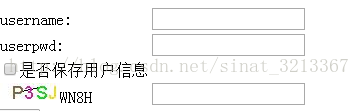
页面上拿到的session的值老是比验证码晚一步,所以采取后台进行验证。这里我也不知道什么原因,望小伙伴们告知。。。
另一种思路,后台生成随机数,前端生成画布,用ajax拿随机数
//后台只生成随机数
	@RequestMapping(value="random.action")
	public void findRandom (HttpServletResponse response) throws IOException{
		 // 验证码字符个数
	     int codeCount = 4;
	     char[] codeSequence = { "A", "B", "C", "D", "E", "F", "G", "H", "I", "J",
		            "K", "L", "M", "N", "O", "P", "Q", "R", "S", "T", "U", "V", "W",
		            "X", "Y", "Z", "0", "1", "2", "3", "4", "5", "6", "7", "8", "9" };

	     // 创建一个随机数生成器类
	        Random random = new Random();
	     // randomCode用于保存随机产生的验证码,以便用户登录后进行验证。
	        StringBuffer randomCode = new StringBuffer();
	        for (int i = 0; i < codeCount; i++) {
	            // 得到随机产生的验证码数字。
	            String strRand = String.valueOf(codeSequence[random.nextInt(36)]);
	            // 将产生的四个随机数组合在一起。
	            randomCode.append(strRand);
	        }
	        PrintWriter out = response.getWriter();
	        out.print(randomCode);
	}
jsp,jq,js代码
<body>
       <canvas id="canvas" width="70" height="34"></canvas>
       <a href="javascript:;" id="img" class="pull-right" style="line-height: 34px;text-indent: 10px;">换一张</a>
       <input type="text" class="form-control" id="yzms" name="yzms" readonly = "readonly" style="display:none" >

  </body>
  <script type="text/javascript">
        $.ajax({
	url:"random.action",
	success:function(k){
		console.log(k)
		 $("#yzms").attr("value",k);
		 drawPic();
	}
})

  $("#img").on("click",function(){
		var _this=$(this)
	 	$.ajax({
			url:"random.action",
			success:function(k){
				console.log(k)
				 $("#yzms").attr("value",k);
				 drawPic();
			}
		})
	})
  /**生成一个随机数**/
  function randomNum(min,max){
    return Math.floor( Math.random()*(max-min)+min);
  }
  /**生成一个随机色**/
  function randomColor(min,max){
    var r = randomNum(min,max);
    var g = randomNum(min,max);
    var b = randomNum(min,max);
    return "rgb("+r+","+g+","+b+")";
  }


  /**绘制验证码图片**/
  function drawPic(){
    var canvas=document.getElementById("canvas");
    var width=canvas.width;
    var height=canvas.height;
    var ctx = canvas.getContext("2d");
    ctx.textBaseline = "bottom";

    /**绘制背景色**/
    ctx.fillStyle = randomColor(180,240); //颜色若太深可能导致看不清
    ctx.fillRect(0,0,width,height);
    /**绘制文字**/

  /*   for(var i=0; i<4; i++){ */
      var txt = $("#yzms").attr("value");
      ctx.fillStyle = randomColor(50,160);  //随机生成字体颜色
      ctx.font = randomNum(15,20)+"px SimHei"; //随机生成字体大小
      var x = 20;
      var y = randomNum(20,30);
      var deg = randomNum(-45, 45);
      //修改坐标原点和旋转角度
      ctx.translate(x,y);
      ctx.rotate(deg*Math.PI/180);
      ctx.fillText(txt, 0,0);
      //恢复坐标原点和旋转角度
      ctx.rotate(-deg*Math.PI/180);
      ctx.translate(-x,-y);
 /*    } */
    /* /**绘制干扰线**/
     for(var i=0; i<8; i++){
      ctx.strokeStyle = randomColor(40,180);
      ctx.beginPath();
      ctx.moveTo( randomNum(0,width), randomNum(0,height) );
      ctx.lineTo( randomNum(0,width), randomNum(0,height) );
      ctx.stroke();
    }
    /**绘制干扰点**/
   /*  for(var i=0; i<100; i++){
      ctx.fillStyle = randomColor(0,255);
      ctx.beginPath();
      ctx.arc(randomNum(0,width),randomNum(0,height), 1, 0, 2*Math.PI);
      ctx.fill();
    }  */
  }
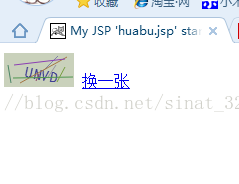
效果展示:
声明:该文观点仅代表作者本人,入门客AI创业平台信息发布平台仅提供信息存储空间服务,如有疑问请联系rumenke@qq.com。
- 上一篇:没有了
- 下一篇:没有了
