
显示页面等比例缩放
最近在工作中遇到一个页面放大问题?放大目标在iframe中,自己的实验贴出来,希望能帮到有这样需求的人。
不多说,直接上图,清楚明白。
(1)正常比例
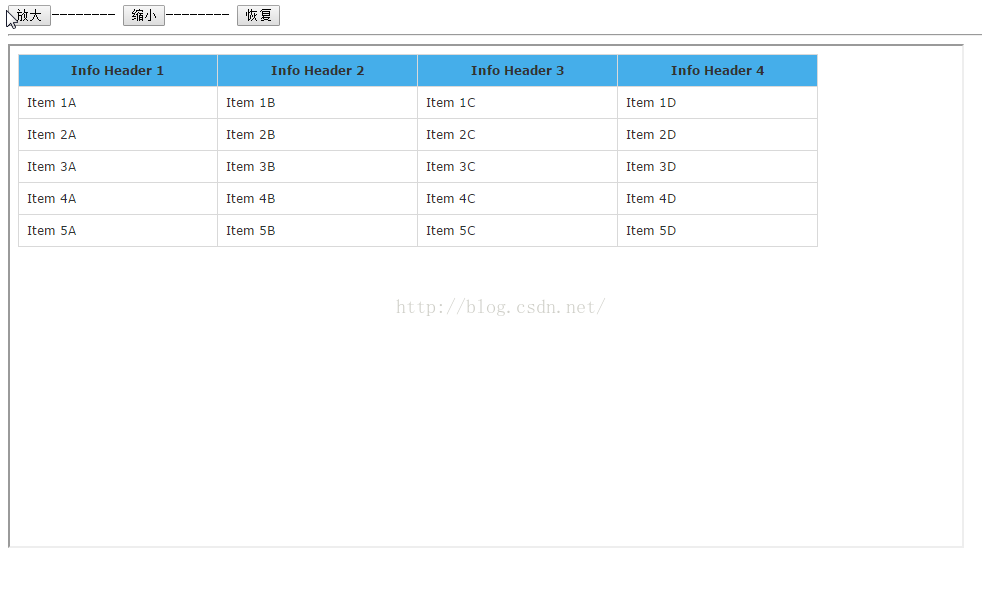
(2)放大
(3)缩小
一、CSS3参考手册
语法:
zoom:normal | <number> | <percentage>
默认值:normal
适用于:所有元素
继承性:有
动画性:是
计算值:绝对长度
取值:
说明:
设置或检索对象的缩放比例。- 对应的脚本特性为zoom。
兼容性:
| Values | IE | Firefox | Chrome | Safari | Opera | iOS Safari | Android Browser | Android Chrome |
|---|---|---|---|---|---|---|---|---|
| Basic Support | 6.0+ | 2.0-40.0 | 4.0+ | 6.0+ | 15.0+ | 6.0+ | 2.1+ | 18.0+ |
二、实验代码
(1)zomm.html<!DOCTYPE html> <html> <head> <meta charset="UTF-8"> <title></title> <script type="text/javascript" src="js/jquery-2.1.0.js" ></script> <script type="text/javascript"> </script> </head> <body> <div> <input type="button" name="" id="" value="放大" onclick="parent.frames["contentiframe"].window.ZoomIn()" />-------- <input type="button" name="" id="" value="缩小" onclick="parent.frames["contentiframe"].window.ZoomOut()" />-------- <input type="button" name="" id="" value="恢复" onclick="parent.frames["contentiframe"].window.initZoom()" /> </div> <hr /> <iframe id="contentiframe" name="contentiframe" style="width:50%;height:500px;" src="sample_table.html">/iframe> </body> </html>
(2)sample_table.html
<!DOCTYPE html>
<html>

	<head>
		<meta charset="UTF-8">
		<title></title>
		<style type="text/css">
			table.hovertable {
				width: 800px;
				font-family: verdana, arial, sans-serif;
				font-size: 11px;
				color: #333333;
				border-width: 1px;
				border-color: #999999;
				border-collapse: collapse;
			}

			table.hovertable th {
				background-color: #45aeea;
				border-width: 1px;
				padding: 8px;
				border-style: solid;
				border-color: #D9D9D9;
			}

			table.hovertable tr {
				background-color: #FFFFFF;
			}

			table.hovertable td {
				border-width: 1px;
				padding: 8px;
				border-style: solid;
				border-color: #D9D9D9;
			}
		</style>
		<script type="text/javascript" src="js/jquery-2.1.0.js" ></script>
		<script>
			var zoomRate = 0.02; //每次放缩比例增量
			var maxRate = 1.5; //最大放大倍数
			var minRate = 0.6; //最小缩小倍数
			var currZoom = 1; //当前缩放比
			//放大
			function ZoomIn() {
				if(currZoom >= maxRate) {
					return;
				} else {
					currZoom += zoomRate;
					$("body").css("zoom",currZoom);
				}
			}
			//缩小
			function ZoomOut() {
				if(currZoom <= minRate) {
					return;
				} else {
					currZoom -= zoomRate;
					$("body").css("zoom",currZoom);
				}
			}
			//恢复正常显示 100%
			function initZoom() {
				currZoom = 1;
				$("body").css("zoom",currZoom);
			}

		</script>

	</head>

	<body>
		<table class="hovertable">
			<tr>
				<th>Info Header 1</th>
				<th>Info Header 2</th>
				<th>Info Header 3</th>
				<th>Info Header 4</th>
			</tr>
			<tr onmouseover="this.style.backgroundColor="#FFE6B0";" onmouseout="this.style.backgroundColor="#FFFFFF";">
				<td>Item 1A</td>
				<td>Item 1B</td>
				<td>Item 1C</td>
				<td>Item 1D</td>
			</tr>
			<tr onmouseover="this.style.backgroundColor="#FFE6B0";" onmouseout="this.style.backgroundColor="#FFFFFF";">
				<td>Item 2A</td>
				<td>Item 2B</td>
				<td>Item 2C</td>
				<td>Item 2D</td>
			</tr>
			<tr onmouseover="this.style.backgroundColor="#FFE6B0";" onmouseout="this.style.backgroundColor="#FFFFFF";">
				<td>Item 3A</td>
				<td>Item 3B</td>
				<td>Item 3C</td>
				<td>Item 3D</td>
			</tr>
			<tr onmouseover="this.style.backgroundColor="#FFE6B0";" onmouseout="this.style.backgroundColor="#FFFFFF";">
				<td>Item 4A</td>
				<td>Item 4B</td>
				<td>Item 4C</td>
				<td>Item 4D</td>
			</tr>
			<tr onmouseover="this.style.backgroundColor="#FFE6B0";" onmouseout="this.style.backgroundColor="#FFFFFF";">
				<td>Item 5A</td>
				<td>Item 5B</td>
				<td>Item 5C</td>
				<td>Item 5D</td>
			</tr>
		</table>
	</body>

</html>
声明:该文观点仅代表作者本人,入门客AI创业平台信息发布平台仅提供信息存储空间服务,如有疑问请联系rumenke@qq.com。
- 上一篇:没有了
- 下一篇:没有了
