
Spring装配bean,依赖注入及注入参数
1、【装配一个bean】
先导入Spring基本jar包
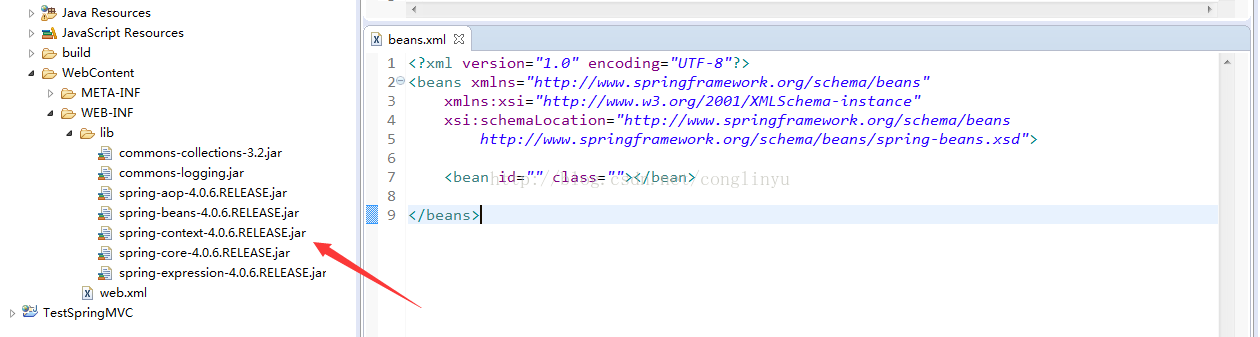
我们先装配一个车的类Car
package com.zhiqi.model;

public class Car {

	private int id;
	private String carName;
	public int getId() {
		return id;
	}
	public void setId(int id) {
		this.id = id;
	}
	public String getCarName() {
		return carName;
	}
	public void setCarName(String carName) {
		this.carName = carName;
	}
}
配置xml文件
<bean id="book" class="com.zhiqi.model.Book"></bean>
<?xml version="1.0" encoding="UTF-8"?>
<beans xmlns="http://www.springframework.org/schema/beans"
    xmlns:xsi="http://www.w3.org/2001/XMLSchema-instance"
    xsi:schemaLocation="http://www.springframework.org/schema/beans
        http://www.springframework.org/schema/beans/spring-beans.xsd">

	<bean id="car" class="com.zhiqi.model.Car"></bean>

</beans>
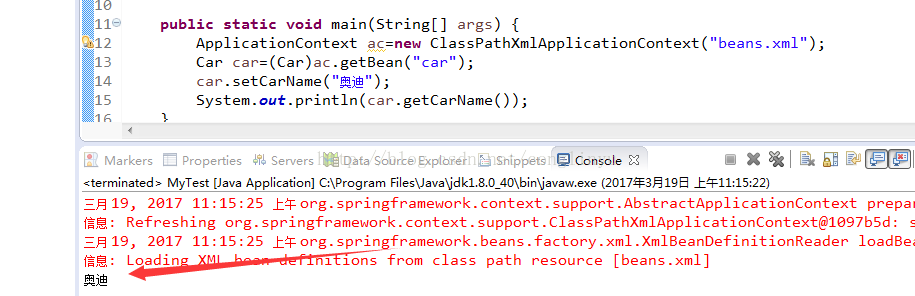
然后在主方法调用ApplicationContext
public class MyTest {

	public static void main(String[] args) {
		ApplicationContext ac=new ClassPathXmlApplicationContext("beans.xml");
		Car car=(Car)ac.getBean("car");
		car.setCarName("奥迪");
		System.out.println(car.getCarName());
	}
}
运行如图:
2、【属性注入】【构造方法注入】【工厂注入】
装配一个Employee类
package com.zhiqi.model;

public class Employee {

	private int id;
	private String name;
	private String sex;
	public int getId() {
		return id;
	}
	public void setId(int id) {
		this.id = id;
	}
	public String getName() {
		return name;
	}
	public void setName(String name) {
		this.name = name;
	}
	public String getSex() {
		return sex;
	}
	public void setSex(String sex) {
		this.sex = sex;
	}
}
属性注入形式:
<bean id="employee" class="com.zhiqi.model.Employee">
<property name="" value=""></property>
</bean>
<?xml version="1.0" encoding="UTF-8"?>
<beans xmlns="http://www.springframework.org/schema/beans"
    xmlns:xsi="http://www.w3.org/2001/XMLSchema-instance"
    xsi:schemaLocation="http://www.springframework.org/schema/beans
        http://www.springframework.org/schema/beans/spring-beans.xsd">

	<bean id="car" class="com.zhiqi.model.Car"></bean>

	<bean id="employee" class="com.zhiqi.model.Employee">
		<property name="id" value="10010"></property>
		<property name="name" value="王经理"></property>
		<property name="sex" value="男"></property>
	</bean>

</beans>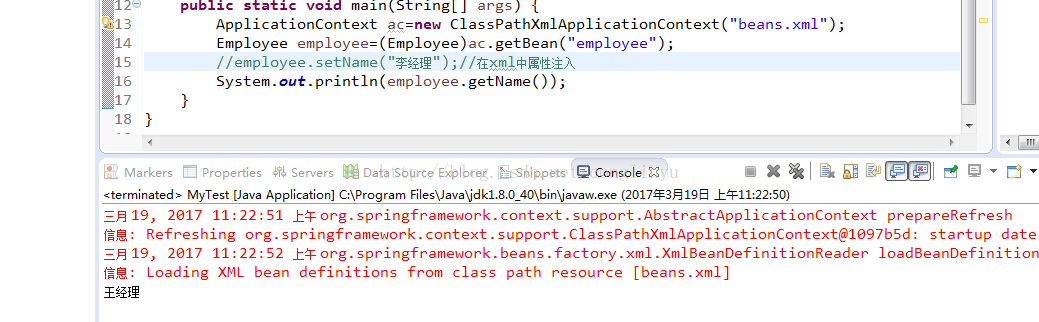
构造方法注入形式:
按照类型、按照索引、综合类型和索引
【类型】
<bean id="employee" class="com.zhiqi.model.Employee">
<constructor-arg type="" value=""></constructor-arg>
</bean>
【索引】
<bean id="" class="">
<constructor-arg index="" value=""></constructor-arg>
</bean>
【类型+索引】
<bean>
<constructor-arg type="" index="" value=""></constructor-arg>
</bean>
【类型示例】
<?xml version="1.0" encoding="UTF-8"?>
<beans xmlns="http://www.springframework.org/schema/beans"
    xmlns:xsi="http://www.w3.org/2001/XMLSchema-instance"
    xsi:schemaLocation="http://www.springframework.org/schema/beans
        http://www.springframework.org/schema/beans/spring-beans.xsd">

	<bean id="car" class="com.zhiqi.model.Car"></bean>

	<bean id="employee" class="com.zhiqi.model.Employee">
		<constructor-arg type="int" value="10010"></constructor-arg>
		<constructor-arg type="String" value="王经理"></constructor-arg>
		<constructor-arg type="String" value="男"></constructor-arg>
	</bean>

</beans>
【索引示例】索引从0开始
<?xml version="1.0" encoding="UTF-8"?>
<beans xmlns="http://www.springframework.org/schema/beans"
    xmlns:xsi="http://www.w3.org/2001/XMLSchema-instance"
    xsi:schemaLocation="http://www.springframework.org/schema/beans
        http://www.springframework.org/schema/beans/spring-beans.xsd">

	<bean id="car" class="com.zhiqi.model.Car"></bean>

	<bean id="employee" class="com.zhiqi.model.Employee">
		<constructor-arg index="0" value="10020"></constructor-arg>
		<constructor-arg index="1" value="刘经理"></constructor-arg>
		<constructor-arg index="2" value="女"></constructor-arg>
	</bean>

</beans>
【类型+索引示例】
<?xml version="1.0" encoding="UTF-8"?>
<beans xmlns="http://www.springframework.org/schema/beans"
    xmlns:xsi="http://www.w3.org/2001/XMLSchema-instance"
    xsi:schemaLocation="http://www.springframework.org/schema/beans
        http://www.springframework.org/schema/beans/spring-beans.xsd">

	<bean id="car" class="com.zhiqi.model.Car"></bean>

	<bean id="employee" class="com.zhiqi.model.Employee">
		<constructor-arg type="int" index="0" value="10020"></constructor-arg>
		<constructor-arg type="String" index="1" value="刘经理"></constructor-arg>
		<constructor-arg type="String" index="2" value="女"></constructor-arg>
	</bean>

</beans>
工厂注入形式:
写一个EmployeeFactory来造Employee
public class EmployeeFactory {

	public Employee createEmployee(){
		Employee emp=new Employee();
		emp.setId(10050);
		emp.setName("孙经理");
		emp.setSex("女");
		return emp;
	}
}
xml配置
<?xml version="1.0" encoding="UTF-8"?>
<beans xmlns="http://www.springframework.org/schema/beans"
    xmlns:xsi="http://www.w3.org/2001/XMLSchema-instance"
    xsi:schemaLocation="http://www.springframework.org/schema/beans
        http://www.springframework.org/schema/beans/spring-beans.xsd">

	<bean id="car" class="com.zhiqi.model.Car"></bean>

	<bean id="employeeFactory" class="com.zhiqi.factory.EmployeeFactory">
	</bean>

	<bean id="employee" factory-bean="employeeFactory" factory-method="createEmployee">
	</bean>

</beans>
静态工厂:
public class EmployeeFactory {

	public static Employee createEmployee(){
		Employee emp=new Employee();
		emp.setId(10050);
		emp.setName("孙经理");
		emp.setSex("女");
		return emp;
	}
}
xml配置
<?xml version="1.0" encoding="UTF-8"?>
<beans xmlns="http://www.springframework.org/schema/beans"
    xmlns:xsi="http://www.w3.org/2001/XMLSchema-instance"
    xsi:schemaLocation="http://www.springframework.org/schema/beans
        http://www.springframework.org/schema/beans/spring-beans.xsd">

	<bean id="car" class="com.zhiqi.model.Car"></bean>

	<bean id="employee" class="com.zhiqi.factory.EmployeeFactory" factory-method="createEmployee">
	</bean>

</beans>
3、注入参数【基本类型】【注入bean】【内部bean】【null值】【级联属性】【集合List Set Map】
前面都是基本类型注入
现在注入一个bean
如:一个员工有一辆车
package com.zhiqi.model;

public class Employee {

	private int id;
	private String name;
	private String sex;
	private Car car;

	public Employee() {
		super();
		// TODO Auto-generated constructor stub
	}
	public Employee(int id, String name, String sex) {
		super();
		this.id = id;
		this.name = name;
		this.sex = sex;
	}

	public int getId() {
		return id;
	}
	public void setId(int id) {
		this.id = id;
	}
	public String getName() {
		return name;
	}
	public void setName(String name) {
		this.name = name;
	}
	public String getSex() {
		return sex;
	}
	public void setSex(String sex) {
		this.sex = sex;
	}
	public Car getCar() {
		return car;
	}
	public void setCar(Car car) {
		this.car = car;
	}
}
xml配置
<?xml version="1.0" encoding="UTF-8"?>
<beans xmlns="http://www.springframework.org/schema/beans"
    xmlns:xsi="http://www.w3.org/2001/XMLSchema-instance"
    xsi:schemaLocation="http://www.springframework.org/schema/beans
        http://www.springframework.org/schema/beans/spring-beans.xsd">

	<bean id="car" class="com.zhiqi.model.Car">
		<property name="id" value="2007"></property>
		<property name="carName" value="奥迪"></property>
	</bean>

	<bean id="employee" class="com.zhiqi.model.Employee">
		<property name="id" value="10080"></property>
		<property name="name" value="贾经理"></property>
		<property name="sex" value="男"></property>
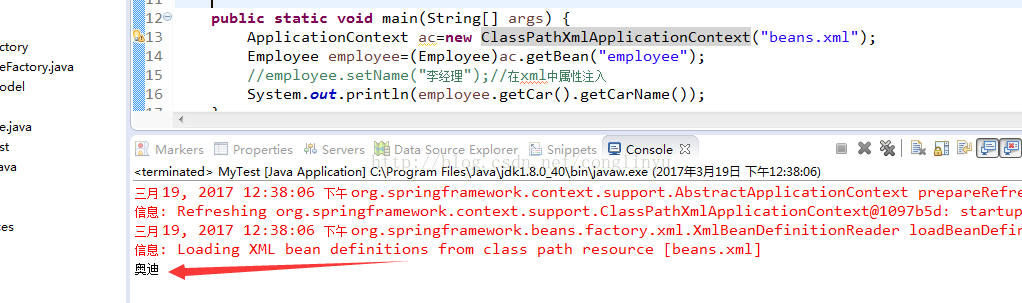
		<property name="car" ref="car"></property>
	</bean>

</beans>
运行:
内部bean,如:一辆车只属于某个员工
<?xml version="1.0" encoding="UTF-8"?>
<beans xmlns="http://www.springframework.org/schema/beans"
    xmlns:xsi="http://www.w3.org/2001/XMLSchema-instance"
    xsi:schemaLocation="http://www.springframework.org/schema/beans
        http://www.springframework.org/schema/beans/spring-beans.xsd">

	<bean id="car" class="com.zhiqi.model.Car">
		<property name="id" value="2007"></property>
		<property name="carName" value="奥迪"></property>
	</bean>

	<bean id="employee" class="com.zhiqi.model.Employee">
		<property name="id" value="10080"></property>
		<property name="name" value="贾经理"></property>
		<property name="sex" value="男"></property>
		<property name="car">
			<bean class="com.zhiqi.model.Car">
				<property name="id" value="6008"></property>
				<property name="carName" value="奥拓"></property>
			</bean>
		</property>
	</bean>

</beans>
null值,如:某个员工没有车
<?xml version="1.0" encoding="UTF-8"?>
<beans xmlns="http://www.springframework.org/schema/beans"
    xmlns:xsi="http://www.w3.org/2001/XMLSchema-instance"
    xsi:schemaLocation="http://www.springframework.org/schema/beans
        http://www.springframework.org/schema/beans/spring-beans.xsd">

	<bean id="car" class="com.zhiqi.model.Car">
		<property name="id" value="2007"></property>
		<property name="carName" value="奥迪"></property>
	</bean>

	<bean id="employee" class="com.zhiqi.model.Employee">
		<property name="id" value="10080"></property>
		<property name="name" value="贾经理"></property>
		<property name="sex" value="男"></property>
		<property name="car">
			<null></null>
		</property>
	</bean>

</beans>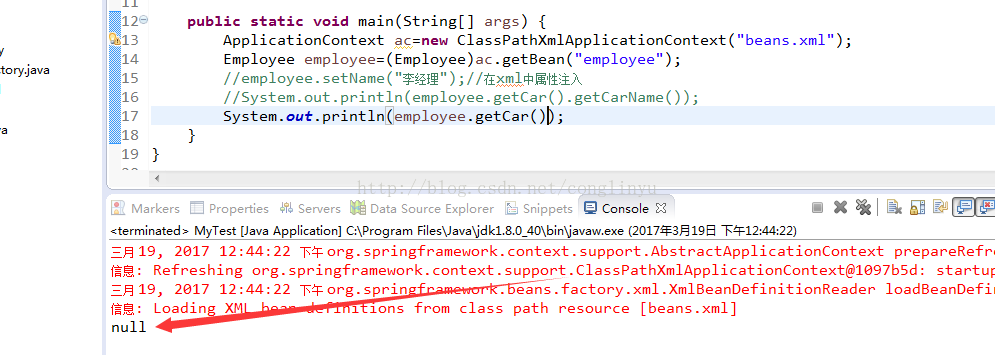
级联,如:
<property name="car.name" value="XX车"></property>
xml配置
<?xml version="1.0" encoding="UTF-8"?>
<beans xmlns="http://www.springframework.org/schema/beans"
    xmlns:xsi="http://www.w3.org/2001/XMLSchema-instance"
    xsi:schemaLocation="http://www.springframework.org/schema/beans
        http://www.springframework.org/schema/beans/spring-beans.xsd">

	<bean id="car" class="com.zhiqi.model.Car">
		<property name="id" value="2007"></property>
		<property name="carName" value="奥迪"></property>
	</bean>

	<bean id="employee" class="com.zhiqi.model.Employee">
		<property name="id" value="10080"></property>
		<property name="name" value="贾经理"></property>
		<property name="sex" value="男"></property>
		<property name="car.id" value="8008"></property>
		<property name="car.carName" value="保时捷"></property>
	</bean>

</beans>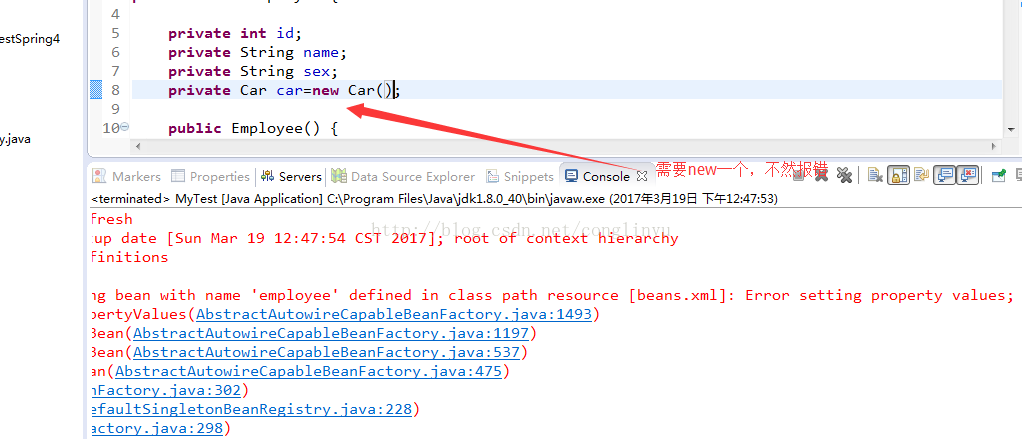
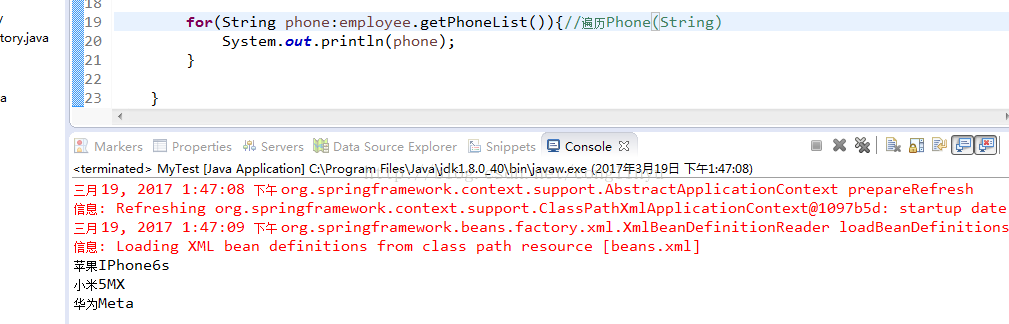
集合List。如:一个员工有多个手机
private List<String> phoneList=new ArrayList<String>();
<?xml version="1.0" encoding="UTF-8"?>
<beans xmlns="http://www.springframework.org/schema/beans"
    xmlns:xsi="http://www.w3.org/2001/XMLSchema-instance"
    xsi:schemaLocation="http://www.springframework.org/schema/beans
        http://www.springframework.org/schema/beans/spring-beans.xsd">

	<!--bean id="car" class="com.zhiqi.model.Car">
		<property name="id" value="2007"></property>
		<property name="carName" value="奥迪"></property>
	</bean-->

	<bean id="employee" class="com.zhiqi.model.Employee">
		<property name="id" value="10080"></property>
		<property name="name" value="贾经理"></property>
		<property name="sex" value="男"></property>
		<!-- 内部bean 需要new -->
		<!--property name="car.id" value="8008"></property>
		<property name="car.carName" value="保时捷"></property-->
		<property name="phoneList">
			<list>
				<value>苹果IPhone6s</value>
				<value>小米5MX</value>
				<value>华为Meta</value>
			</list>
		</property>
	</bean>

</beans>
运行:
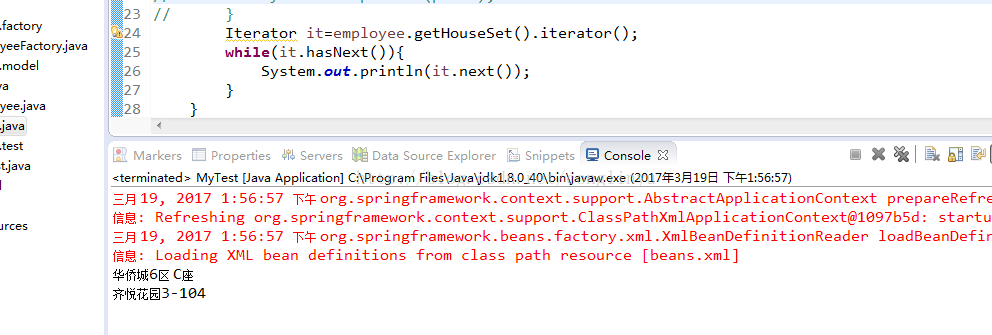
集合Set。如:一个员工有多套房子
xml配置
<?xml version="1.0" encoding="UTF-8"?>
<beans xmlns="http://www.springframework.org/schema/beans"
    xmlns:xsi="http://www.w3.org/2001/XMLSchema-instance"
    xsi:schemaLocation="http://www.springframework.org/schema/beans
        http://www.springframework.org/schema/beans/spring-beans.xsd">

	<!--bean id="car" class="com.zhiqi.model.Car">
		<property name="id" value="2007"></property>
		<property name="carName" value="奥迪"></property>
	</bean-->

	<bean id="employee" class="com.zhiqi.model.Employee">
		<property name="id" value="10080"></property>
		<property name="name" value="贾经理"></property>
		<property name="sex" value="男"></property>
		<!-- 内部bean 需要new -->
		<!--property name="car.id" value="8008"></property>
		<property name="car.carName" value="保时捷"></property-->
		<property name="phoneList">
			<list>
				<value>苹果IPhone6s</value>
				<value>小米5MX</value>
				<value>华为Meta</value>
			</list>
		</property>
		<property name="houseSet">
			<set>
				<value>华侨城6区 C座</value>
				<value>齐悦花园3-104</value>
			</set>
		</property>
	</bean>

</beans>
Set集合遍历
Map集合,如:一个员工有多个QQ
private Map<String,String> qqMap=new HashMap<String,String>();
<?xml version="1.0" encoding="UTF-8"?>
<beans xmlns="http://www.springframework.org/schema/beans"
    xmlns:xsi="http://www.w3.org/2001/XMLSchema-instance"
    xsi:schemaLocation="http://www.springframework.org/schema/beans
        http://www.springframework.org/schema/beans/spring-beans.xsd">

	<!--bean id="car" class="com.zhiqi.model.Car">
		<property name="id" value="2007"></property>
		<property name="carName" value="奥迪"></property>
	</bean-->

	<bean id="employee" class="com.zhiqi.model.Employee">
		<property name="id" value="10080"></property>
		<property name="name" value="贾经理"></property>
		<property name="sex" value="男"></property>
		<!-- 内部bean 需要new -->
		<!--property name="car.id" value="8008"></property>
		<property name="car.carName" value="保时捷"></property-->
		<property name="phoneList">
			<list>
				<value>苹果IPhone6s</value>
				<value>小米5MX</value>
				<value>华为Meta</value>
			</list>
		</property>
		<property name="houseSet">
			<set>
				<value>华侨城6区 C座</value>
				<value>齐悦花园3-104</value>
			</set>
		</property>
		<property name="qqMap">
			<map>
				<entry>
					<key><value>工作QQ</value></key>
					<value>10078</value>
				</entry>
				<entry>
					<key><value>私密QQ</value></key>
					<value>10079</value>
				</entry>
			</map>
		</property>
	</bean>

</beans>
运行: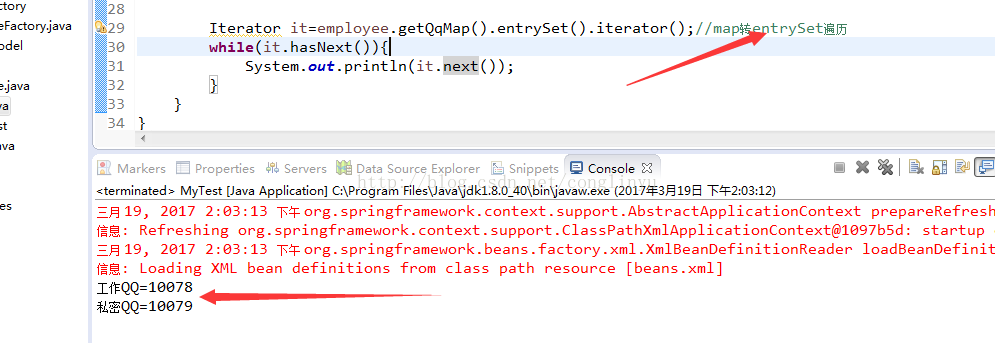
- 上一篇:没有了
- 下一篇:没有了
