
Base64编解码原理及AES加解密算法的使用
Base64编解码
1英文字符=1字节=8位
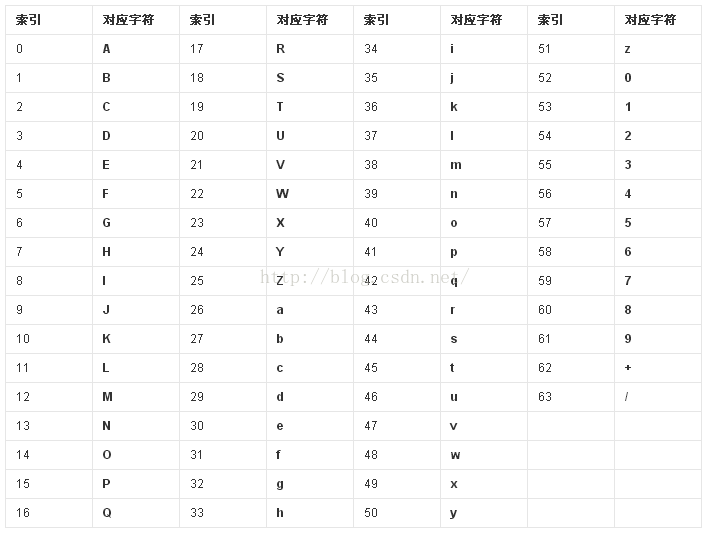
Base64编码原理:将要编码的二进制(字符串、图片等都可以转换成二进制格式表示)把3个8位字节以4个6位的字节表示,然后把每个6位字节都转换成一个单独的数字并映射到base64码表中的一个字符。如果最后剩下的字节不足3个,则在后面补0,补0转换的字符用“=”表示,故编码后输出的字符串末尾可能会有一个或两个“=”。
base64码表如下:
base64编解码:
public class Base {

    public static String encode(String str) throws Exception {
        return Base64.encodeToString(str.getBytes("utf-8"), Base64.DEFAULT);
    }

    public static String decode(String str) throws Exception {
        return new String(Base64.decode(str.getBytes("utf-8"), Base64.DEFAULT),
                "utf-8");
    }
}
调用:
String encode = null;
try {
    encode = Base.encode("Hello World");
} catch (Exception e1) {
    e1.printStackTrace();
}
System.out.println("zyf encode:" + encode);
if (encode != null) {
    try {
        String decode = Base.decode(encode);
        System.out.println("zyf decode:" + decode);
    } catch (Exception e) {
        e.printStackTrace();
    }
}
输出结果:
zyf encode:SGVsbG8gV29ybGQ=
zyf decode:Hello World
编码过程:
binary  dec Base64
010010  18  S
000110  6   G
010101  21  V
101100  44  s
011011  27  b
000110  6   G
111100  60  8
100000  32  g
010101  29  d
110110  54  2
111101  61  9
110010  50  y
011011  27  b
000110  6   G
010000  16  Q
AES加解密
public class AES {

    public static String Encrypt(String sSrc, String sKey) throws Exception {
        String result = null;
        byte[] key = sKey.getBytes("utf-8");
        SecretKeySpec secretKeySpec = new SecretKeySpec(key, "AES");
        Cipher cipher = Cipher.getInstance("AES");
        cipher.init(Cipher.ENCRYPT_MODE, secretKeySpec);
        byte[] input = cipher.doFinal(sSrc.getBytes("utf-8"));
        // 此处使用Base64做转码功能,能起到2次加密的作用
        result = Base64.encodeToString(input, Base64.DEFAULT);
        return result;
    }

    public static String Decrypt(String sSrc, String sKey) throws Exception {
        String result = null;
        byte[] key = sKey.getBytes("utf-8");
        SecretKeySpec secretKeySpec = new SecretKeySpec(key, "AES");
        Cipher cipher = Cipher.getInstance("AES");
        cipher.init(Cipher.DECRYPT_MODE, secretKeySpec);
        byte[] input = Base64.decode(sSrc, Base64.DEFAULT);// 先base64解码
        byte[] data = cipher.doFinal(input);
        result = new String(data, "utf-8");
        return result;
    }
}
调用:
// Key的长度必须是16位或24位或32位
String key = "1234567812345678";
String encrypt = null;
try {
    encrypt = AES.Encrypt("key=name;value=zyf", key);
} catch (Exception e) {
    System.out.println("zyf fail to encrypt : " + e);
    e.printStackTrace();
}
System.out.println("zyf encrypt:" + encrypt);
if (encrypt != null) {
    String decrypt = null;
    try {
        decrypt = AES.Decrypt(encrypt, key);
    } catch (Exception e) {
        System.out.println("zyf fail to decrypt : " + e);
        e.printStackTrace();
    }
    System.out.println("zyf decrypt:" + decrypt);
}
输出结果:
zyf encrypt:r/PScGYWs4Qu7oclZCteoBPOKRkvkxkR8sS2h9EO3is=
zyf decrypt:key=name;value=zyf
为了防止反编译key被破解,key值可以放到C代码中。
声明:该文观点仅代表作者本人,入门客AI创业平台信息发布平台仅提供信息存储空间服务,如有疑问请联系rumenke@qq.com。
- 上一篇:没有了
- 下一篇:没有了
