
gradle build提示You have not accepted the license agreements of the following SDK components
http://majing.io/questions/804
从Android Gradle plugin 2.2.0开始,gradle会自动加载需要的SDK, build-tools,但是因为没有接受license,导致加载依赖终止,提示
* What went wrong:
A problem occurred configuring project ":app".
> You have not accepted the license agreements of the following SDK components:
[Android SDK Build-Tools 24.0.2].

Before building your project, you need to accept the license agreements and complete the installation of the missing components using the Android Studio SDK Manager.

Alternatively, to learn how to transfer the license agreements from one workstation to another, go to http://d.android.com/r/studio-ui/export-licenses.html
license存放在$ANDROID_HOME/licenses下
创建license
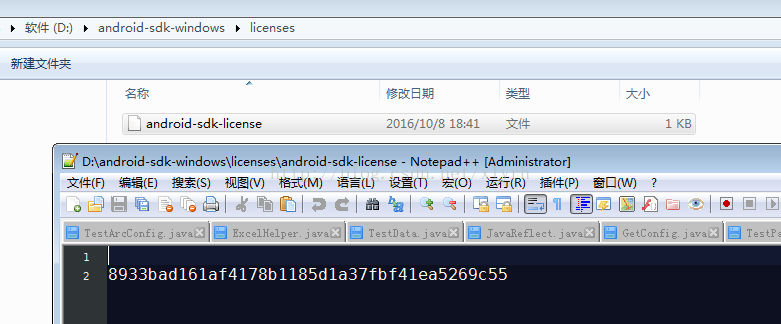
对应不同系统,配置好环境后,直接创建对应的bat批处理或者sh脚本,双击执行,执行后到下图路径下确认,
在指定路径下创建成功对应文件夹文件,并且内容一致
Windows脚本:
echo |set /p="8933bad161af4178b1185d1a37fbf41ea5269c55" > "%ANDROID_HOME%licensesandroid-sdk-license"
Linux脚本:
mkdir "$ANDROID_HOME/licenses"echo -e " 8933bad161af4178b1185d1a37fbf41ea5269c55" > "$ANDROID_HOME/licenses/android-sdk-license"
-------------------------------------------------2017-08-17 补充
针对windows用户补充说明下:
这两条命令在Android的home目录下执行,即androidsdk的环境变量配置目录,
如果不知道的可以在命令提示符中执行set ANDROID_HOME即可看到
最后放置结果如下所示,如果对命令不熟悉的,也可以直接到对应目录下手动创建该license
如有问题可以发邮件给我,xlyrh@qq.com
声明:该文观点仅代表作者本人,入门客AI创业平台信息发布平台仅提供信息存储空间服务,如有疑问请联系rumenke@qq.com。
- 上一篇:没有了
- 下一篇:没有了
