
利用vue.js实现被选中状态的改变
在使用原型实现使不选中状态改变之后,接触到vue,就想着能不能使用vue再把功能实现一边,在上篇中的页面并没有动态实现页面,所有的数据也都是直接写在html中。而使用vue之后,已经能够实现页面根据数据的多少动态生成。而且代码量也大幅度减少。
html部分的代码:
<div data-role="page " class="page ">
    <div class="center " id="app">
        <div class="group ">
	    <ul>
		<li v-for = "todo in todos ">
		    <div class="groupheader ">
			<div class="Gheadertext ">{{todo.groupheader}}</div>
		    </div>
		    <div  class = "groupbody ">
			<ul class="list ">
			    <li v-for="cell in todo.groupbody" v-on:click="exchange($event)" class="groupcell">
				<div class="celltext">
				    {{ cell.text }}
				</div>
				<img class="selectimg"  src="img/select.png ">
			    </li>
			</ul>
		    </div>
		 </li>
	    </ul>
	</div>
    </div>
</div>
数据代码:
var datas = {
    todos :[
    {
        groupheader : "MB3101",
        groupbody:[
            { text: "调整不当"},
            { text: "光电开关损坏" },
            { text: "镜面积灰" },
            { text: "调整不当" },
            { text: "光电开关损坏" },
            { text: "镜面积灰" },
            { text: "调整不当" },
            { text: "光电开关损坏" },
            { text: "镜面积灰" },
        ]
    },
    {
        groupheader : "MB3102",
        groupbody:[
            { text: "调整不当" },
            { text: "光电开关损坏" },
            { text: "镜面积灰" },
            { text: "调整不当" },
            { text: "光电开关损坏" },
            { text: "镜面积灰" },
            { text: "调整不当" },
            { text: "光电开关损坏" },
            { text: "镜面积灰" },
        ]
    },
    {
        groupheader : "MB3103",
        groupbody:[
            { text: "调整不当" },
            { text: "光电开关损坏" },
            { text: "镜面积灰" },
            { text: "调整不当" },
            { text: "光电开关损坏" },
            { text: "镜面积灰" },
            { text: "调整不当" },
            { text: "光电开关损坏" },
            { text: "镜面积灰" },
        ]
    }
  ]
}
js部分的代码:
new Vue({
  el: "#app",
  data:datas,
  methods:{
      exchange:function(event){
         //获取被点击的元素对象
         var a = event.target;
         //获取被点击元素中的子元素<img>
         var cellimg = a.getElementsByTagName("img")[0];
         if(a.className == "groupcell") {
	     a.className = "selectcell";
	     cellimg.style.display = "block";
	 }
	 else if(a.className == "selectcell") {
	     a.className = "groupcell";
	     cellimg.style.display = "none";
	 }
      }
  }
})
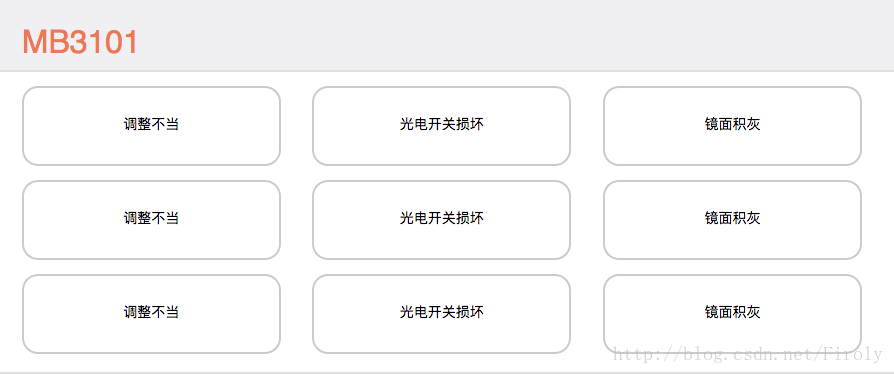
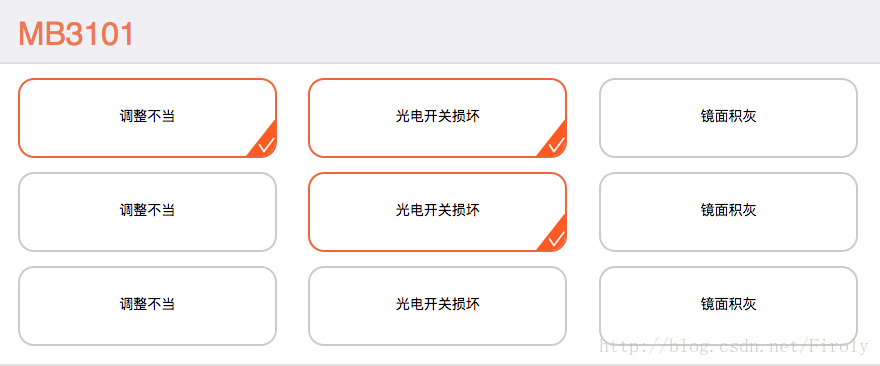
效果如图所示:
声明:该文观点仅代表作者本人,入门客AI创业平台信息发布平台仅提供信息存储空间服务,如有疑问请联系rumenke@qq.com。
- 上一篇:没有了
- 下一篇:没有了
