
【ThinkPHP】ThinkPHP对Mysql数据库的增删改查,volist标签附带条件判断的用法
在《【ThinkPHP】ThinkPHP下载、部署,Helloworld,消除难看的index.php》(点击打开链接)介绍了ThinkPHP控制层与视图层之间的交互。下面用一个例子,介绍ThinkPHP如何对Mysql数据库的增删改查,也就是ThinkPHP的MVC的到底是如何交互的。
在test数据库中,有一张如下图所示的usertable表:
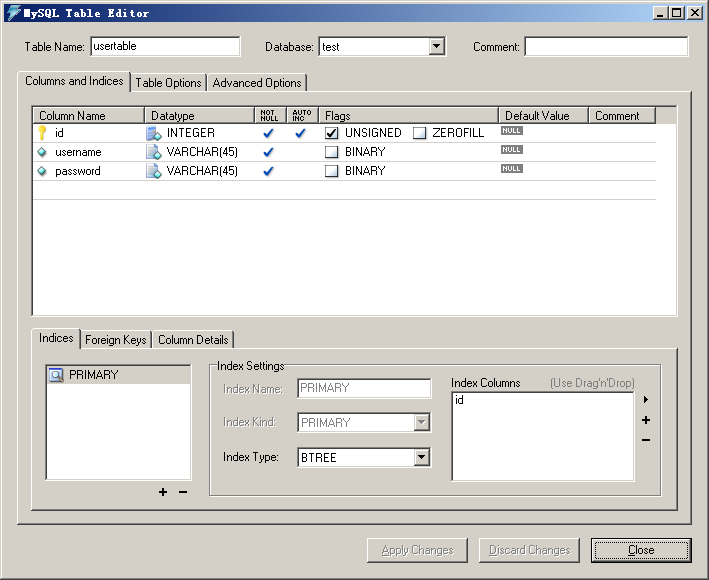
建表语句如下:
"usertable", "CREATE TABLE `usertable` (
  `id` int(10) unsigned NOT NULL AUTO_INCREMENT,
  `username` varchar(45) NOT NULL,
  `password` varchar(45) NOT NULL,
  PRIMARY KEY (`id`)
) ENGINE=InnoDB AUTO_INCREMENT=15 DEFAULT CHARSET=utf8"
如下图,利用ThinkPHP进入User这个Action就能对这张表实现增删改查的功能,一进入页面就能先读取到此表的信息。之后,能够实现一些基本的增删改查的动作。
用户信息表的背景颜色交错显示,以此来说明ThinkPHP中volist标签附带条件判断的用法。
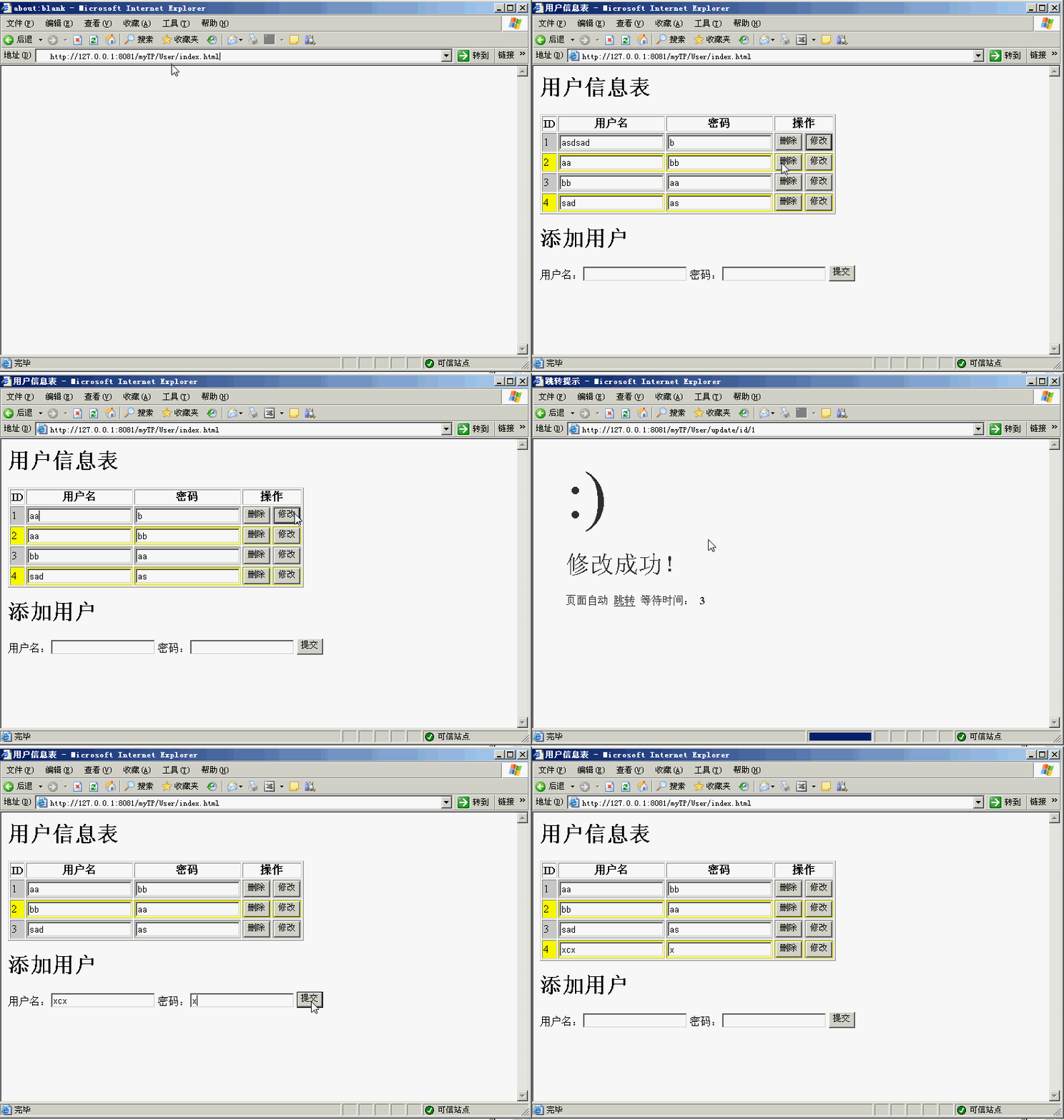
制作过程如下:
1、配置好ThinkPHP之后,修改(工程目录)Confconfig.php如下,将ThinkPHP工程与Mysql中的test数据库关联起来。
现在此ThinkPHP实际上可以操作test数据库中任意一张表。
<?php
return array(
	"URL_MODEL"=>2,//设置url重写
	//数据库设置
	"DB_TYPE"=>"mysql",//数据库类型
	"DB_HOST"=>"localhost",//服务器地址
	"DB_NAME"=>"test",//数据库名
	"DB_USER"=>"root",//用户名
	"DB_PWD"=>"root",//密码
	"DB_PORT"=>3306,//端口
	"DB_PREFIX"=>"",//数据库表前缀,这里没有,留空
);
?>
2、在(工程目录)LibAction下创建UserAction.class.php,写入如下代码:
<?php
	class UserAction extends Action{
		//访问http://127.0.0.1:8081/myTP/User首页显示的方法
		public function index(){
			$User=M("usertable");//查出整张usertable表存入实体$User中
			$this->assign("users", $User->select());//将整个实体$User推送到index.html中的users变量中,此变量是一个类似数组的结合体
			$this->display();
		}
		//在数据库添加条目的方法
		public function create(){
			$User=M("usertable");//在test数据库中找到usertable这张表
			$username_from_page=$_POST["username"];//获取传递过来的文件名
			if($User->where("username="$username_from_page"")->count()){//判断此用户名是否存在
				$this->error("以存在相同的用户名!请修改!",U("User/index"),3);
			}
			else{//如果不存在,则将传递过来的所有信息入库,并且3秒之后跳转到User/index方法
				$User->create();
				$User->add();
				$this->success("添加成功!",U("User/index"),3);
			}
		}
		//在数据库删除条目的方法
		public function delete(){
 			$User=M("usertable");
 			$id_from_page=$_GET["id"];//获取网页传递过来的id
 			$User->where("id="$id_from_page"")->delete();//找到要删除的id删除
  			$this->success("删除成功!",U("User/index"),3);
		}
		//在数据库中修改条目的方法。
		public function update(){
			$User=M("usertable");
			//获取网页传递过来的参数
			$id_from_page=$_GET["id"];
			$username_from_page=$_POST["username"];
			$password_from_page=$_POST["password"];
			//并且写入data这个数组
			$data["username"] = $username_from_page;
			$data["password"] = $password_from_page;
			if($User->where("username="$username_from_page"")->count()){//判断是否已经存在此用户名
				$this->error("以存在相同的用户名!请修改!",U("User/index"),3);
			}
			else{//如果没有,则修改
				$User->where("id="$id_from_page"")->save($data);
				$this->success("修改成功!",U("User/index"),3);
			}
		}
	}
?>
(1)此处,在数据库添加条目的核心是create()方法与add()方法,删除条目的关键是delete()方法,修改则是,带数组参数的save()方法。
(2)跳转的方法直接利用success()与error()方法跳转,第一个参数是提示信息,第二个参数U中为“Action类/类中方法”的形式,第三个参数为跳转时间。
(3)$User->where("username="$username_from_page"")->count()中的count()方法,是返回一个条目数量,利用考察条目数量是否为0的方式,去考察这个条目是否存在。同样可以用来统计存在的数量。
3、最后在(工程目录)Tpl下创建一个User文件夹,以对应这个User Action,再于(工程目录)TplUser里面新建一个index.html,代码如下:
<!DOCTYPE html>
<html>
<head>
	<title>用户信息表</title>
</head>
<body>

	<h1>用户信息表</h1>
	<table border="1">
		<tr>
			<th>ID</th><th>用户名</th><th>密码</th><th colspan="2">操作</th>
		</tr>
		<volist name="users" id="u">
        	<form action="__APP__/User/update/id/{$u.id}" method="post">
                <if condition="$i%2 neq 0"><tr bgcolor="#CCCCCC"></if><!--根据项数的奇偶,设置表格行的背景颜色-->
                <if condition="$i%2 eq 0"><tr bgcolor="#FFFF00"></if>
                    <td>{$i}</td>
                    <td><input type="text" name="username" value="{$u.username}"/></td>
                    <td><input type="text" name="password" value="{$u.password}"/></td>
                    <td><button onclick="javascript:window.location.href="__APP__/User/delete/id/{$u.id}"">删除</button></td><!--此按钮与表单无关-->
                    <td><input type="submit" value="修改"></td>
                </tr>
         	</form>
		</volist>
	</table>

	<h1>添加用户</h1>
	<form action="__APP__/User/create" method="post">
		用户名:<input type="text" name="username" />密码:<input type="text" name="password" /><input type="submit" value="提交">
	</form>

</body>
</html>
(1)可以看到,在此html页面,所有表单要执行的action皆指向__APP__/User/(User Action 类中要执行方法),与UserAction.class.php形成对应关系,如果要带get参数的话,之后则写成__APP__/User/(User Action 类的方法)/(参数名)/(参数值)的形式。如果要带多个参数则采用如下的形式:
例如:
访问http://serverName.com/index.php/Blog/read/2012/03
则可以在Blog控制器的read操作方法里面采用,获取到第1个参数2012与第2个参数03:
$year = $GET["_URL_"][2];//2012
$month = $GET["_URL_"][3];//03
(2)标签volist相当于jstl的c:foreach标签,name是要Action传递过来的变量,id是在volist节点下,此变量的标志。$i不用声明就能使用,也不要自己声明一个i,为循环的游标/迭代器,用于记录当前循环的项数。
(3)利用if condition标签,可以形成条件结构。条件结构中的等于的关键字是eq,不等于的关键字是neq,可以据此实现表格颜色的交错效果。
- 上一篇:没有了
- 下一篇: 【php】文字转图片
