
yii2 console 集成swoole 执行异步任务,例如注册邮件,发送短信
一,环境编译
参考地址:
https://github.com/LinkedDestiny/swoole-doc/blob/master/01-%E7%8E%AF%E5%A2%83%E6%90%AD%E5%BB%BA%E5%8F%8A%E6%89%A9%E5%B1%95%E5%AE%89%E8%A3%85.md
二,项目部署
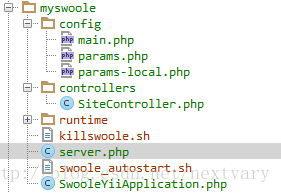
1,目录结构:
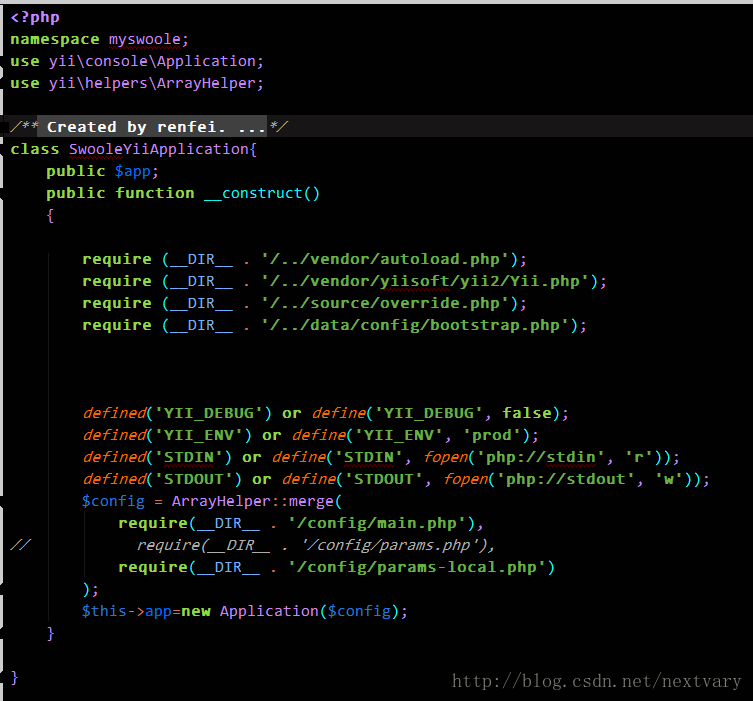
①,SwooleYiiApplication.php:
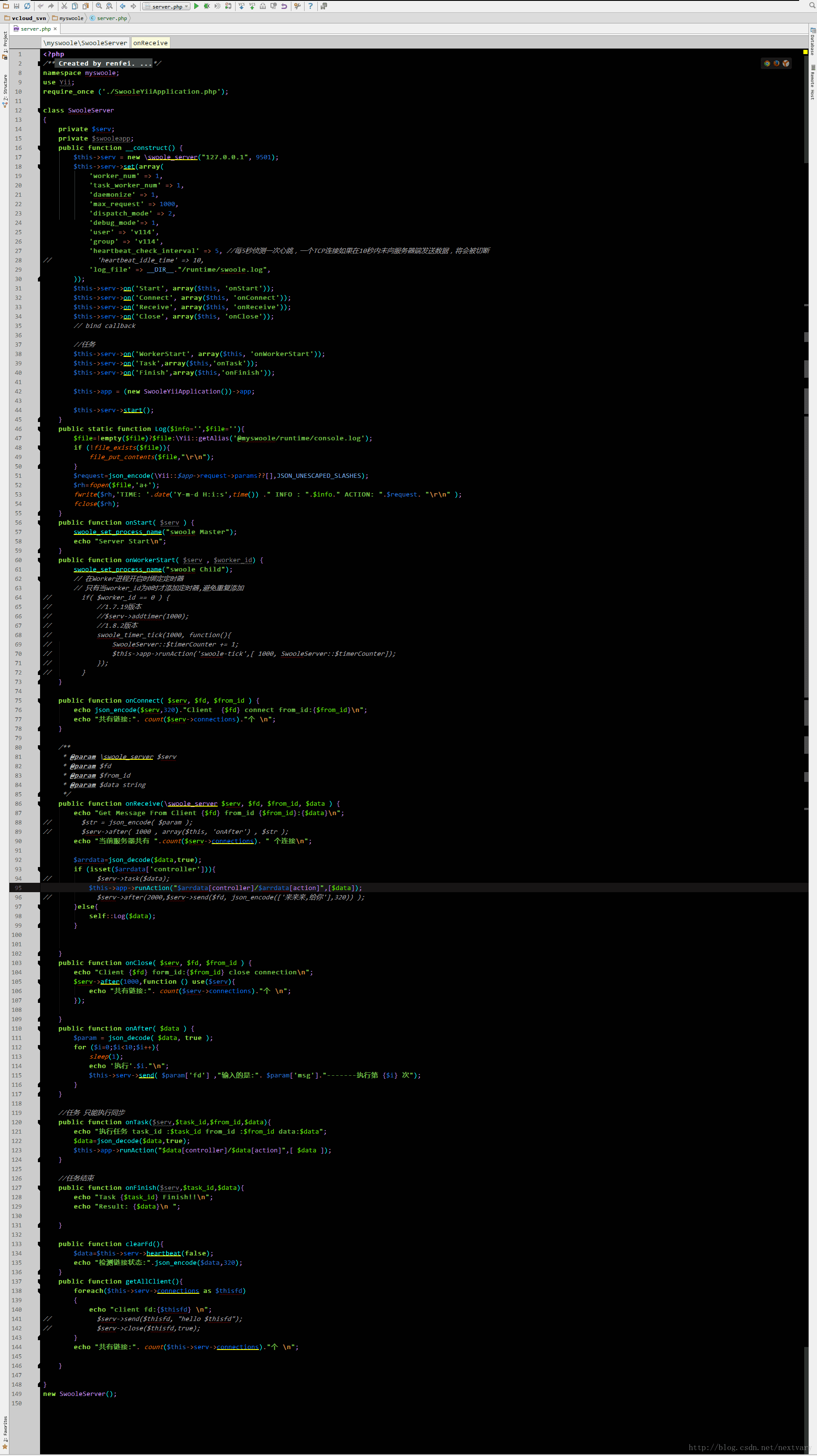
②,server.php
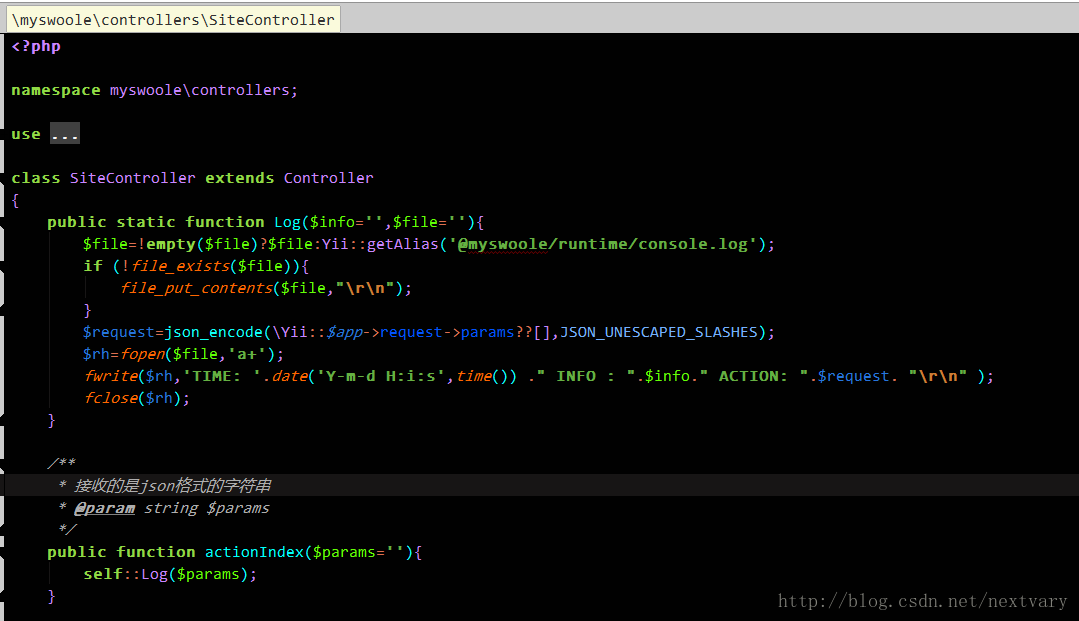
③,sitecontroller.php
三,运行
1,两个shell脚本,保证 swoole 进程常驻
①:crontab -e
*/1 * * * * /home/shell/swoole_autostart.sh
②:killswoole.sh:killswoole子进程
#!/bin/bash
for i in `ps -eaf |grep swoole |grep -v sh |grep -v grep | awk "{print $2}"`
do
    echo "kill swoole pid: [ $i ]"
    kill -9 $i
done
ulimit -c unlimited
③:swoole_autostart.sh :自动启动
#!/bin/bash
count=`ps -fe |grep "swoole" | grep -v "grep" | grep "Master" | wc -l`
if [ $count -lt 1 ];
then
    /home/...../killswoole.sh
    /usr/local/php/bin/php  /home/..../myswoole/server.php
    echo "start ok!!"
else
    echo "已启动"
fi
2,项目部署完毕,在yii2 某一控制器中执行发送邮件等操作
①:先看看服务端:
    public function __construct() {
        $this->serv = new swoole_server("127.0.0.1", 9501);
        $this->serv->set(array(
            "worker_num" => 1,
            "task_worker_num" => 1,
            "daemonize" => 1,
            "max_request" => 1000,
            "dispatch_mode" => 2,
            "debug_mode"=> 1,
            "user" => "v114",
            "group" => "v114",
            "heartbeat_check_interval" => 5, //每5秒侦测一次心跳,一个TCP连接如果在10秒内未向服务器端发送数据,将会被切断
//            "heartbeat_idle_time" => 10,
            "log_file" => __DIR__."/runtime/swoole.log",
        ));
        $this->serv->on("Start", array($this, "onStart"));
        $this->serv->on("Connect", array($this, "onConnect"));
        $this->serv->on("Receive", array($this, "onReceive"));
        $this->serv->on("Close", array($this, "onClose"));
        // bind callback

        //任务
        $this->serv->on("WorkerStart", array($this, "onWorkerStart"));
        $this->serv->on("Task",array($this,"onTask"));
        $this->serv->on("Finish",array($this,"onFinish"));

        $this->app = (new SwooleYiiApplication())->app;

        $this->serv->start();
    }
$this->serv->on("Receive", array($this, "onReceive"));
public function onReceive(swoole_server $serv, $fd, $from_id, $data ) {
echo "Get Message From Client {$fd} from_id {$from_id}:{$data}
";
// $str = json_encode( $param );
// $serv->after( 1000 , array($this, "onAfter") , $str );
echo "当前服务器共有 ".count($serv->connections). " 个连接
";
$arrdata=json_decode($data,true);
if (isset($arrdata["controller"])){
//下面的代码就用上了yii2 consoleapplication,去执行某一方法(看目录结构,controllers目录下的控制器),以及传递的参数
$this->app->runAction("$arrdata[controller]/$arrdata[action]",[$data]);
}else{
self::Log($data);
}
}②:此方法表示swoole客户端链接swoole服务端
连接服务器,想执行sitecontroler->index 方法:(此方法,可以改成发短信,邮件….看上图只是记录下接收到的参数),此方法在需要执行,发送数据给服务器
    //$data:表示要执行什么控制器,传递的参数,想传什么传什么,json格式
    public function actionTest(){

        $client = new swoole_client(SWOOLE_SOCK_TCP  | SWOOLE_KEEP);
        try{
            $client->connect("127.0.0.1", 9501);
            if( !$client->isConnected())
            {
                exit("connect failed
");
            }
            $data=json_encode(["controller"=>"site","action"=>"index","params"=>["nickname"=>"next_vary"]],320);
//            $data="close";
            $client->send($data);

//            $client->close(true);

            }catch (Exception $e){
                 return $e->getMessage();
            }

    }
最终:
执行效果图:
swoole.log
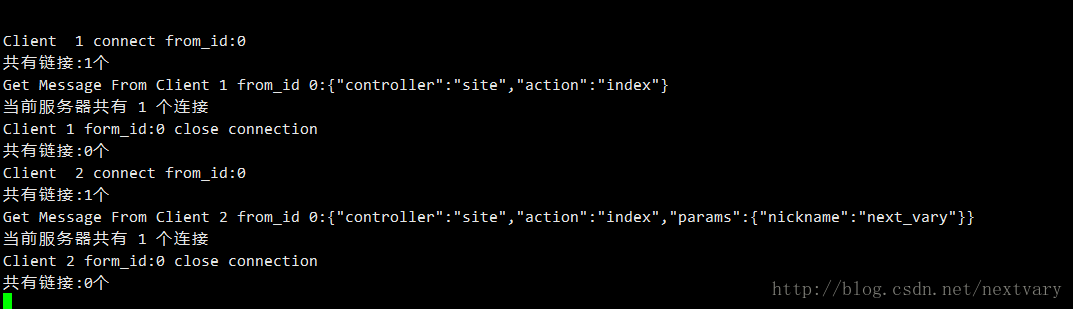
console.log

素材下载地址:http://download.csdn.net/download/nextvary/10219126
参考资料:
http://blog.csdn.net/xiaog351/article/details/51107808
https://wiki.swoole.com/wiki/page/p-quickstart.html
声明:该文观点仅代表作者本人,入门客AI创业平台信息发布平台仅提供信息存储空间服务,如有疑问请联系rumenke@qq.com。
- 上一篇:没有了
- 下一篇: html input 输入框自动填充, 自动补全提示
