
vue2.0基于vue-cli,element-ui饿了么vue前端开源项目制作vue的树形table,treeTable
该组件基于技术栈,主要涉及vue-cli生成的webpack项目脚手架,在此脚手架项目基础上完成的,整合了element-ui开源vue的UI项目
1.vue-cli的安装使用
npm install -g vue-cli
全局安装vue-cli之后,使用该脚手架的相关命令,可快速生成一个比较规范的vue项目结构
vue init <template-name> <project-name>
例子
vue init webpack treeTable
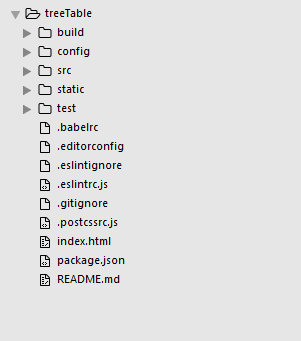
这样一个快速的项目结构生成,如下所示,中间一路回车就可以了,主要是设置了是否支持eslint等等
2.整合element-ui
cd treeTable
进入刚刚生成的项目目录中, 安装element-ui
npm i element-ui -S
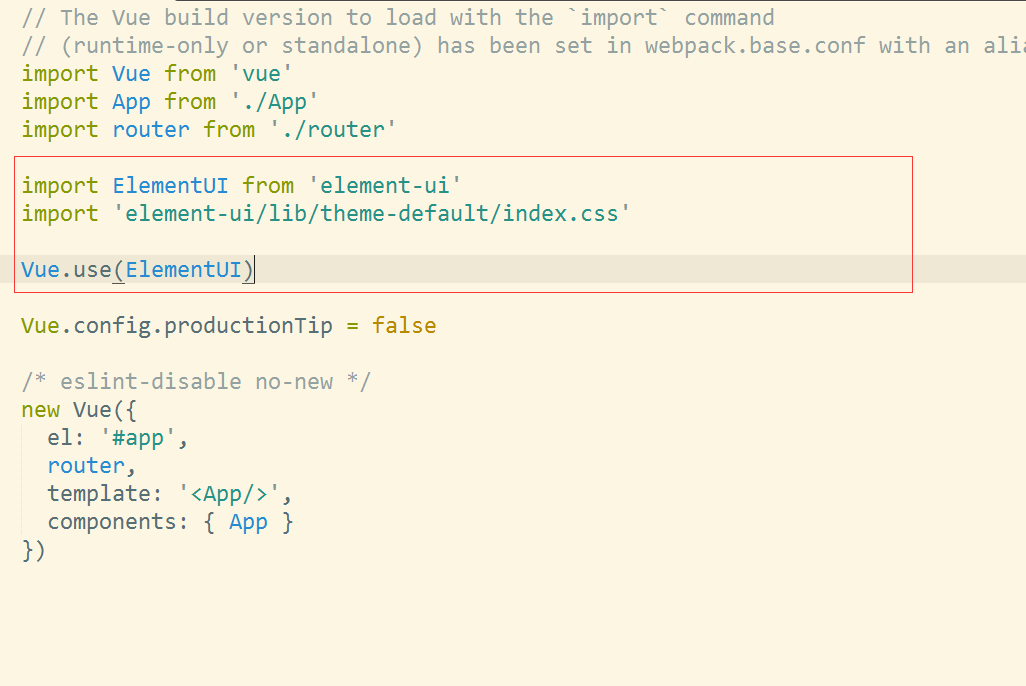
在main.js中,
import ElementUI from "element-ui"
import "element-ui/lib/theme-default/index.css"

Vue.use(ElementUI)
整合就可以了,具体element-ui更多的使用和操作,可以去官网查看 http://element.eleme.io/#/zh-CN/component/quickstart
我这里主要是利用他的table组件来制作一个树形结构的table。
3.树形table组件制作
在src目录的components目录中,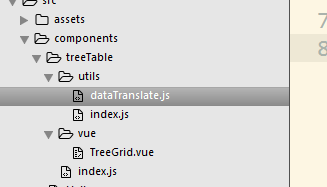
其中utils下面提供一些需要用的工具类 vue目录下面是组件的源码 index.js是外包入口
相关代码 dataTranslate.js主要是提供了把数组数据转换成树形结构的数据,并且进行相关属性的添加
/*
* @Author: sunlandong
* @Date:   2017-03-11 12:06:49
* @Last Modified by:   sunlandong
* @Last Modified time: 2017-03-11 16:30:03
*/


import Vue from "vue"
function DataTransfer (data) {
  if (!(this instanceof DataTransfer)) {
    return new DataTransfer(data, null, null)
  }
}


DataTransfer.treeToArray = function (data, parent, level, expandedAll) {
  let tmp = []
  Array.from(data).forEach(function (record) {
    if (record._expanded === undefined) {
      Vue.set(record, "_expanded", expandedAll)
    }
    if (parent) {
      Vue.set(record, "_parent", parent)
    }
    let _level = 0
    if (level !== undefined && level !== null) {
      _level = level + 1
    }
    Vue.set(record, "_level", _level)
    tmp.push(record)
    if (record.children && record.children.length > 0) {
      let children = DataTransfer.treeToArray(record.children, record, _level, expandedAll)
      tmp = tmp.concat(children)
    }
  })
  return tmp
}


export default DataTransfer
utils/index.js
/*
* @Author: sunlandong
* @Date:   2017-03-11 12:06:55
* @Last Modified by:   sunlandong
* @Last Modified time: 2017-03-11 16:36:56
*/
import MSDataTransfer from "./dataTranslate.js"
export default {
	MSDataTransfer
}
TreeGrid.vue是树形table组件的源码
<template>
  <el-table
    :data="data"
    border
    style="width: 100%"
    :row-style="showTr">
    <el-table-column v-for="(column, index) in columns" :key="column.dataIndex"
      :label="column.text">
      <template scope="scope">
        <span v-if="spaceIconShow(index)" v-for="(space, levelIndex) in scope.row._level" class="ms-tree-space"></span>
        <button class="button is-outlined is-primary is-small" v-if="toggleIconShow(index,scope.row)" @click="toggle(scope.$index)">
          <i v-if="!scope.row._expanded" class="el-icon-caret-right" aria-hidden="true"></i>
          <i v-if="scope.row._expanded" class="el-icon-caret-bottom" aria-hidden="true"></i>
        </button>
        <span v-else-if="index===0" class="ms-tree-space"></span>
        {{scope.row[column.dataIndex]}}
      </template>
    </el-table-column>
    <el-table-column label="操作" v-if="treeType === "normal"" width="260">
      <template scope="scope">
        <button type="button" class="el-button el-button--default el-button--small">
          <router-link
            :to="{ path: requestUrl + "edit", query: {id: scope.row.Oid} }"
            tag="span">
            编辑
          </router-link>
        </button>
        <el-button
          size="small"
          type="danger"
          @click="handleDelete()">
          删除
        </el-button>
        <button type="button" class="el-button el-button--success el-button--small">
          <router-link :to="{ path: requestUrl, query: {parentId: scope.row.parentOId} }"
                       tag="span">
            添加下级树结构
          </router-link>
        </button>
      </template>
    </el-table-column>
  </el-table>
</template>
<script>
  import Utils from "../utils/index.js"
//  import Vue from "vue"
  export default {
    name: "tree-grid",
    props: {
// 该属性是确认父组件传过来的数据是否已经是树形结构了,如果是,则不需要进行树形格式化
      treeStructure: {
        type: Boolean,
        default: function () {
          return false
        }
      },
// 这是相应的字段展示
      columns: {
        type: Array,
        default: function () {
          return []
        }
      },
// 这是数据源
      dataSource: {
        type: Array,
        default: function () {
          return []
        }
      },
// 这个作用是根据自己需求来的,比如在操作中涉及相关按钮编辑,删除等,需要向服务端发送请求,则可以把url传过来
      requestUrl: {
        type: String,
        default: function () {
          return ""
        }
      },
// 这个是是否展示操作列
      treeType: {
        type: String,
        default: function () {
          return "normal"
        }
      },
// 是否默认展开所有树
      defaultExpandAll: {
        type: Boolean,
        default: function () {
          return false
        }
      }
    },
    data () {
      return {}
    },
    computed: {
    // 格式化数据源
      data: function () {
        let me = this
        if (me.treeStructure) {
          let data = Utils.MSDataTransfer.treeToArray(me.dataSource, null, null, me.defaultExpandAll)
          console.log(data)
          return data
        }
        return me.dataSource
      }
    },
    methods: {
    // 显示行
      showTr: function (row, index) {
        let show = (row._parent ? (row._parent._expanded && row._parent._show) : true)
        row._show = show
        return show ? "" : "display:none;"
      },
    // 展开下级
      toggle: function (trIndex) {
        let me = this
        let record = me.data[trIndex]
        record._expanded = !record._expanded
      },
    // 显示层级关系的空格和图标
      spaceIconShow (index) {
        let me = this
        if (me.treeStructure && index === 0) {
          return true
        }
        return false
      },
    // 点击展开和关闭的时候,图标的切换
      toggleIconShow (index, record) {
        let me = this
        if (me.treeStructure && index === 0 && record.children && record.children.length > 0) {
          return true
        }
        return false
      },
      handleDelete () {
        this.$confirm("此操作将永久删除该记录, 是否继续?", "提示", {
          confirmButtonText: "确定",
          cancelButtonText: "取消",
          type: "error"
        }).then(() => {
          this.$message({
            type: "success",
            message: "删除成功!"
          })
        }).catch(() => {
          this.$message({
            type: "info",
            message: "已取消删除"
          })
        })
      }
    }
  }
</script>
<style scoped>
  .ms-tree-space{position: relative;
    top: 1px;
    display: inline-block;
    font-family: "Glyphicons Halflings";
    font-style: normal;
    font-weight: 400;
    line-height: 1;
    width: 18px;
    height: 14px;}
  .ms-tree-space::before{content: ""}
  table td{
    line-height: 26px;
  }
</style>
index.js
import TreeGrid from "./vue/TreeGrid.vue"

module.exports = {
  TreeGrid
}
使用
<template>
  <div class="hello">
    <tree-grid :columns="columns" :tree-structure="true" :data-source="dataSource"></tree-grid>
  </div>
</template>

<script>
import {TreeGrid} from "./treeTable"
export default {
  name: "hello",
  data () {
    return {
      columns: [
          {
            text: "姓名",
            dataIndex: "name"
          },
          {
            text: "年龄",
            dataIndex: "age"
          },
          {
            text: "性别",
            dataIndex: "sex"
          }
        ],
      dataSource: [
        {
          id: 1,
          parentId: 0,
          name: "测试1",
          age: 18,
          sex: "男",
          children: [
            {
              id: 2,
              parentId: 1,
              name: "测试2",
              age: 22,
              sex: "男"
            }
          ]
        },
        {
          id: 3,
          parentId: 0,
          name: "测试3",
          age: 23,
          sex: "女",
          children: [
            {
              id: 4,
              parentId: 3,
              name: "测试4",
              age: 22,
              sex: "男"
            },
            {
              id: 5,
              parentId: 3,
              name: "测试5",
              age: 25,
              sex: "男"
            },
            {
              id: 6,
              parentId: 3,
              name: "测试6",
              age: 26,
              sex: "女",
              children: [
                {
                  id: 7,
                  parentId: 6,
                  name: "测试7",
                  age: 27,
                  sex: "男"
                }
              ]
            }
          ]
        },
        {
          id: 18,
          parentId: 0,
          name: "测试8",
          age: 18,
          sex: "男"
        }
      ]
    }
  },
  components: {
    TreeGrid
  }
}
</script>

<!-- Add "scoped" attribute to limit CSS to this component only -->
<style scoped>
</style>
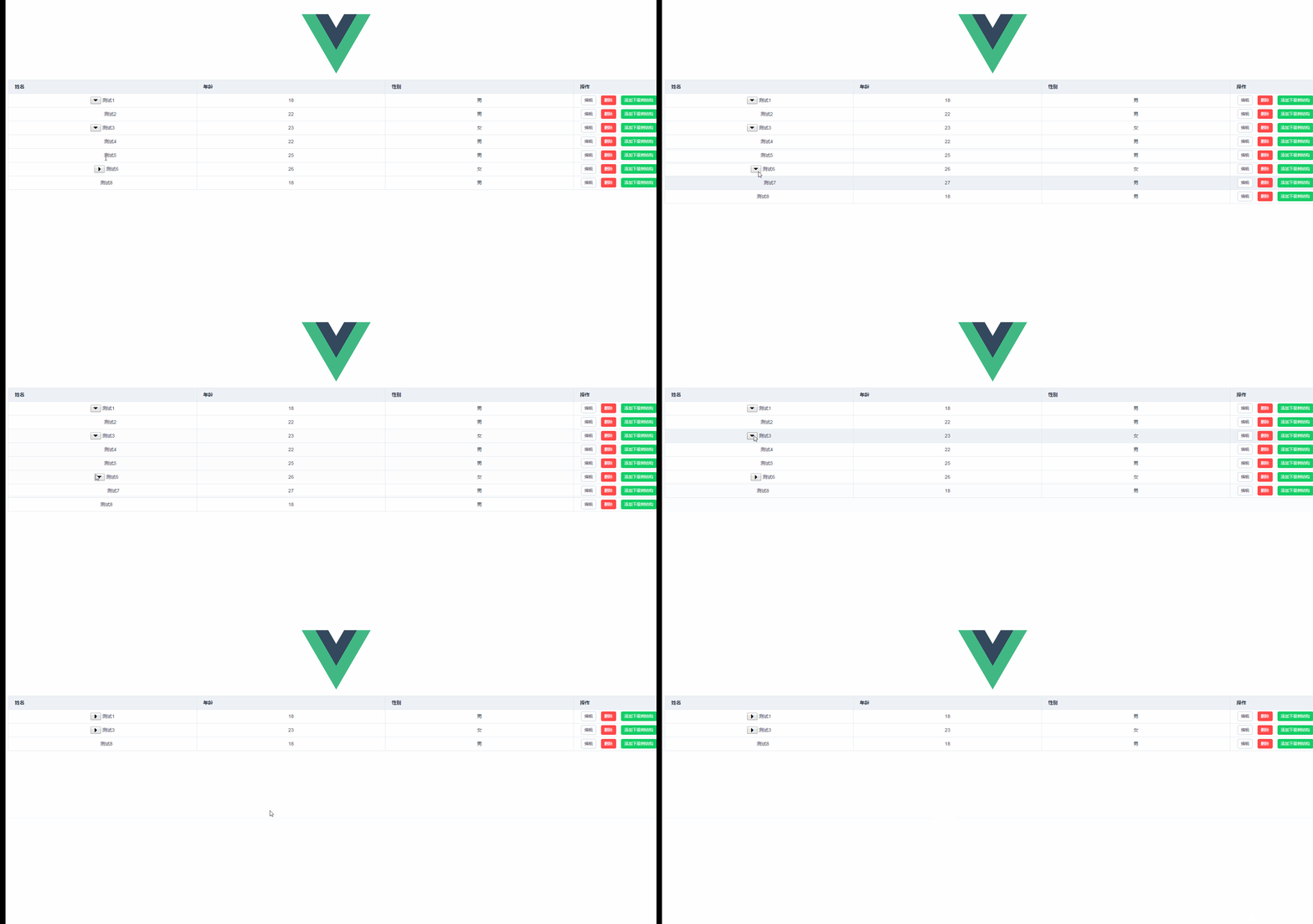
效果图
https://github.com/sunlandong/treeTable github上下载源码
声明:该文观点仅代表作者本人,入门客AI创业平台信息发布平台仅提供信息存储空间服务,如有疑问请联系rumenke@qq.com。
- 上一篇: springAOP与自定义注解实现细粒度权限控制管理
- 下一篇:没有了
