
HTTP协议分析系列(五)------php+socket编程发送http请求
一、php+socket请求原理
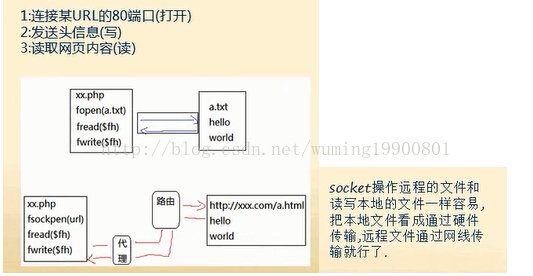
二、模拟POST请求
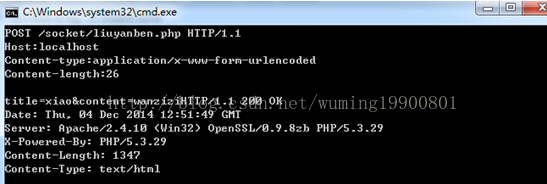
三、封装自己的HTTP类
 //http请求类的接口
interface Proto{
	//连接url
	function conn($url);
	//发送get查询
	function get();
	//发送post查询
	function post();
	//关闭连接
	function close();
}
class Http implements Proto{
	const CRLF="
";
	protected $errno=-1;
	protected $errstr="";
	protected $response="";
	protected $url=null;
	protected $version="HTTP/1.1";
	protected $fh=null;
	protected $line=array();
	protected $header=array();
	protected $body=array();

	public function __construct($url){
		$this->conn($url);
		$this->setHeader("Host:".$this->url["host"]);
	}
	//此方法负责写请求行
	protected function setLine($method){
		$this->line[0]=$method." ".$this->url["path"]." ".$this->version;
	}
	//此方法负责写头信息
	protected function setHeader($headerline){
		$this->header[]=$headerline;
	}
	//此方法负责写主体信息
	protected function setBody($body){

		$this->body[]=http_build_query($body);;
	}
	//连接url
	function conn($url){
		$this->url=parse_url($url);
		//判断端口
		if(!isset($this->url["port"])){
			$this->url["port"]=80;
		}
		$this->fh=fsockopen($this->url["host"],$this->url["port"],$this->errno,$this->errstr,3);
	}
	//构造get请求的数据
	function get(){
		$this->setLine("GET");
		$this->request();
		return $this->response;
	}
	//构造post请求的数据
	function post($body=array()){
		//构造主体信息
		$this->setLine("POST");

		//设置content-type
		$this->setHeader("Content-type:application/x-www-form-urlencoded");
		//设置主体信息,比GET不一样的地方
		$this->setBody($body);
		//计算content-length
		$this->setHeader("Content-length:".strlen($this->body[0]));
		$this->request();
		return $this->response;
	}
	//真正请求
	function request(){
		//把请求行,头信息,实体信息  放在一个数组里,便于拼接
		$req=array_merge($this->line,$this->header,array(""),$this->body,array(""));
		$req=implode(self::CRLF,$req);
		fwrite($this->fh,$req);

		while(!feof($this->fh)){
			$this->response.=fread($this->fh,1024);
		}

		$this->close();//关闭连接
		return $this->response;
	}
	//关闭连接
	function close(){
		fclose($this->fh);
	}
}
四、测试功能,实现批量发帖功能
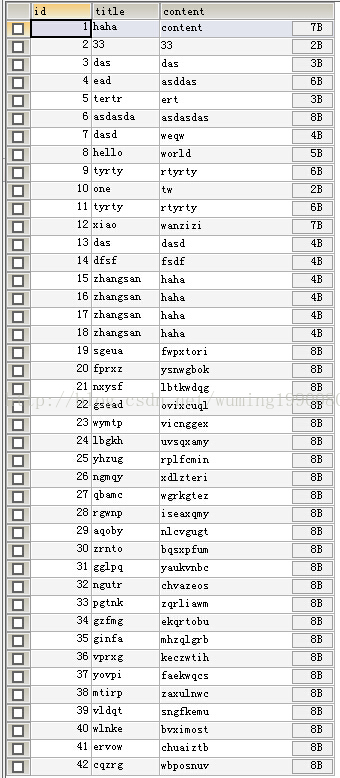
(一)、建立数据表

(二)、程序实现
(1)、建立liuyanben.php
<!DOCTYPE html PUBLIC "-//W3C//DTD XHTML 1.0 Transitional//EN" "http://www.w3.org/TR/xhtml1/DTD/xhtml1-transitional.dtd">
<html xmlns="http://www.w3.org/1999/xhtml">
<head>
<meta http-equiv="Content-Type" content="text/html; charset=utf-8" />

</head>
<body>
<?php
$link=mysql_connect("localhost","root","root");
mysql_select_db("test");
mysql_set_charset("utf8");

if(!empty($_POST)){
	$sql="insert liuyanben(id,title,content) values(null,"{$_POST["title"]}","{$_POST["content"]}")";
	mysql_query($sql);
}

$sql="select * from liuyanben";

$result=mysql_query($sql);
while($row=mysql_fetch_assoc($result)){
	$list[]=$row;
}
?>
<form method="post" action="liuyanben.php">
<table border="1">
	<tr>
		<td>编号</td>
		<td>标题</td>
		<td>内容</td>
	</tr>
	<?php
	foreach($list as $key=>$value){
	?>
	<tr>
		<td><?php echo $value["id"];?></td>
		<td><?php echo $value["title"];?></td>
		<td><?php echo $value["content"];?></td>
	</tr>
	<?php
	}
	?>

</table>
	<input type="text" name="title"><br/>
	<input type="text" name="content"><br/>
	<input type="submit" value="提交">
</form>
</body>
</html>
(2).实现批量发帖
set_time_limit(0);
$url="http://localhost/socket/liuyanben.php";

for($i=1;$i<100;$i++){
	$str=str_shuffle("abcdefghigklmnopqrstuvwxyz");
	$title=substr($str,0,5);
	$content=substr($str,6,8);
	$http=new Http($url);
	$http->post(array("title"=>$title,"content"=>$content,"submit"=>"留言"));
	echo $title."--------".$con."<br/>";
	usleep(2000);
}
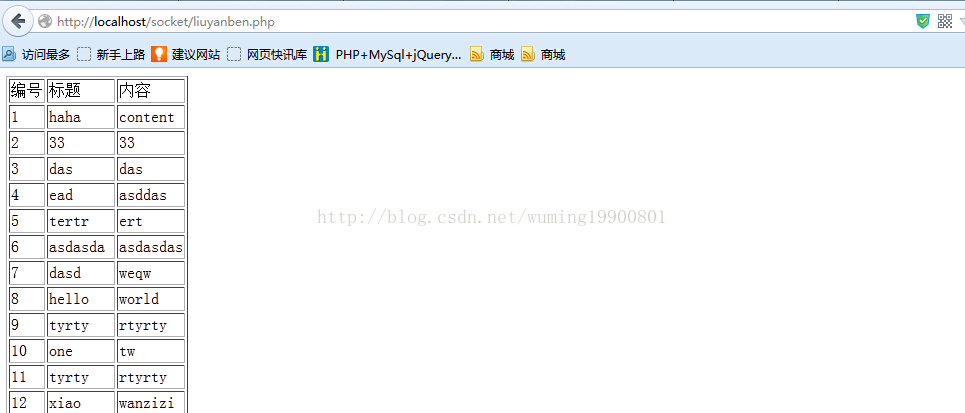
(三)、实验结果
查看页面
声明:该文观点仅代表作者本人,入门客AI创业平台信息发布平台仅提供信息存储空间服务,如有疑问请联系rumenke@qq.com。
