
shiro登录过程分析
转自:http://blog.csdn.net/jin5203344/article/details/53174341
关于shiro就不用做过多介绍了,今天主要分析下登录过程
首先我大致画了个流程图(可能不够详细):
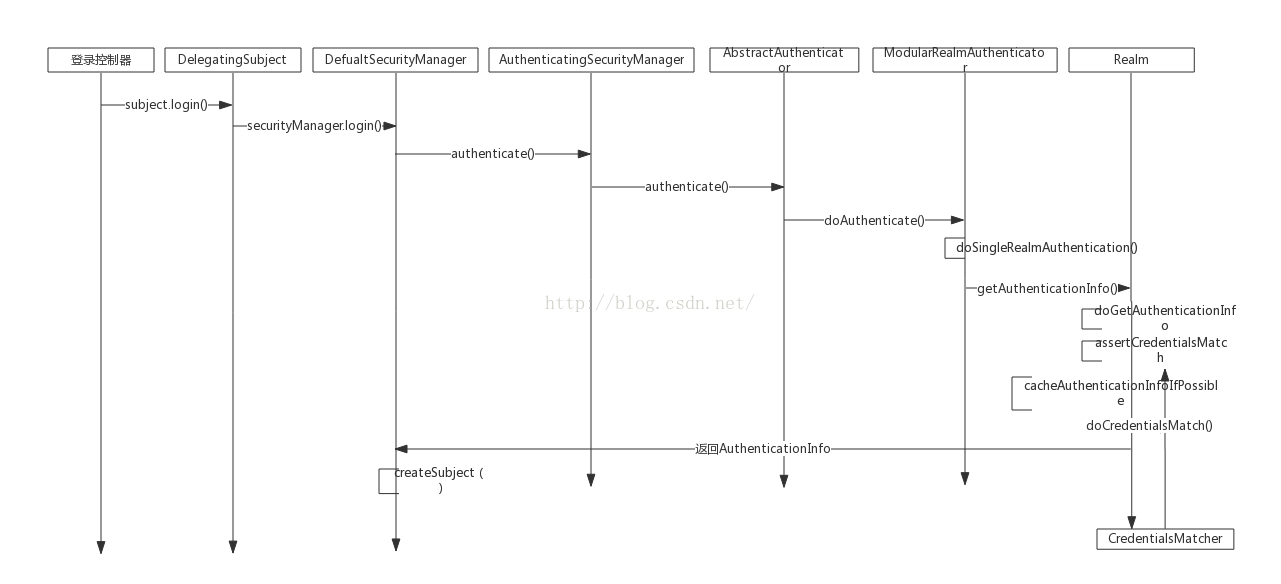
第一步:用户登录,根据用户登录名密码生产Token
[java] view plain copy
- UsernamePasswordToken token = new UsernamePasswordToken(username, password);
- Subject subject = SecurityUtils.getSubject();
- subject.login(token);
[java] view plain copy
- public void login(AuthenticationToken token) throws AuthenticationException {
- clearRunAsIdentitiesInternal();
- Subject subject = securityManager.login(this, token);
- PrincipalCollection principals;
- String host = null;
- if (subject instanceof DelegatingSubject) {
- DelegatingSubject delegating = (DelegatingSubject) subject;
- //we have to do this in case there are assumed identities - we don"t want to lose the "real" principals:
- principals = delegating.principals;
- host = delegating.host;
- } else {
- principals = subject.getPrincipals();
- }
- if (principals == null || principals.isEmpty()) {
- String msg = "Principals returned from securityManager.login( token ) returned a null or " +
- "empty value. This value must be non null and populated with one or more elements.";
- throw new IllegalStateException(msg);
- }
- this.principals = principals;
- this.authenticated = true;
- if (token instanceof HostAuthenticationToken) {
- host = ((HostAuthenticationToken) token).getHost();
- }
- if (host != null) {
- this.host = host;
- }
- Session session = subject.getSession(false);
- if (session != null) {
- this.session = decorate(session);
- } else {
- this.session = null;
- }
- }
第二步:调用securityManager的login方法
[java] view plain copy
- public Subject login(Subject subject, AuthenticationToken token) throws AuthenticationException {
- AuthenticationInfo info;
- try {
- info = authenticate(token);
- } catch (AuthenticationException ae) {
- try {
- onFailedLogin(token, ae, subject);
- } catch (Exception e) {
- if (log.isInfoEnabled()) {
- log.info("onFailedLogin method threw an " +
- "exception. Logging and propagating original AuthenticationException.", e);
- }
- }
- throw ae; //propagate
- }
- Subject loggedIn = createSubject(token, info, subject);
- onSuccessfulLogin(token, info, loggedIn);
- return loggedIn;
- }
[java] view plain copy
- public AuthenticationInfo authenticate(AuthenticationToken token) throws AuthenticationException {
- return this.authenticator.authenticate(token);
- }
[java] view plain copy
- public AuthenticatingSecurityManager() {
- super();
- this.authenticator = new ModularRealmAuthenticator();
- }
第四步:调用AbstractAuthenticator的authenticate方法
[java] view plain copy
- public final AuthenticationInfo authenticate(AuthenticationToken token) throws AuthenticationException {
- if (token == null) {
- throw new IllegalArgumentException("Method argumet (authentication token) cannot be null.");
- }
- log.trace("Authentication attempt received for token [{}]", token);
- AuthenticationInfo info;
- try {
- info = doAuthenticate(token);
- if (info == null) {
- String msg = "No account information found for authentication token [" + token + "] by this " +
- "Authenticator instance. Please check that it is configured correctly.";
- throw new AuthenticationException(msg);
- }
- } catch (Throwable t) {
- AuthenticationException ae = null;
- if (t instanceof AuthenticationException) {
- ae = (AuthenticationException) t;
- }
- if (ae == null) {
- //Exception thrown was not an expected AuthenticationException. Therefore it is probably a little more
- //severe or unexpected. So, wrap in an AuthenticationException, log to warn, and propagate:
- String msg = "Authentication failed for token submission [" + token + "]. Possible unexpected " +
- "error? (Typical or expected login exceptions should extend from AuthenticationException).";
- ae = new AuthenticationException(msg, t);
- }
- try {
- notifyFailure(token, ae);
- } catch (Throwable t2) {
- if (log.isWarnEnabled()) {
- String msg = "Unable to send notification for failed authentication attempt - listener error?. " +
- "Please check your AuthenticationListener implementation(s). Logging sending exception " +
- "and propagating original AuthenticationException instead...";
- log.warn(msg, t2);
- }
- }
- throw ae;
- }
- log.debug("Authentication successful for token [{}]. Returned account [{}]", token, info);
- notifySuccess(token, info);
- return info;
- }
第五步:调用ModularRealmAuthenticator的doAuthenticate方法
[java] view plain copy
- protected AuthenticationInfo doAuthenticate(AuthenticationToken authenticationToken) throws AuthenticationException {
- assertRealmsConfigured();
- Collection<Realm> realms = getRealms();
- if (realms.size() == 1) {
- return doSingleRealmAuthentication(realms.iterator().next(), authenticationToken);
- } else {
- return doMultiRealmAuthentication(realms, authenticationToken);
- }
- }
一个property 为realm的属性 对属性注入的时候调用的setRealm方法
[java] view plain copy
- public void setRealm(Realm realm) {
- if (realm == null) {
- throw new IllegalArgumentException("Realm argument cannot be null");
- }
- Collection<Realm> realms = new ArrayList<Realm>(1);
- realms.add(realm);
- setRealms(realms);
- }
第六步:调用ModularRealmAuthenticator的doSingleRealmAuthentication方法
[java] view plain copy
- protected AuthenticationInfo doSingleRealmAuthentication(Realm realm, AuthenticationToken token) {
- if (!realm.supports(token)) {
- String msg = "Realm [" + realm + "] does not support authentication token [" +
- token + "]. Please ensure that the appropriate Realm implementation is " +
- "configured correctly or that the realm accepts AuthenticationTokens of this type.";
- throw new UnsupportedTokenException(msg);
- }
- AuthenticationInfo info = realm.getAuthenticationInfo(token);
- if (info == null) {
- String msg = "Realm [" + realm + "] was unable to find account data for the " +
- "submitted AuthenticationToken [" + token + "].";
- throw new UnknownAccountException(msg);
- }
- return info;
- }
第七步:调用AuthenticatingRealm的getAuthenticationInfo方法
[java] view plain copy
声明:该文观点仅代表作者本人,入门客AI创业平台信息发布平台仅提供信息存储空间服务,如有疑问请联系rumenke@qq.com。
- 上一篇: ThinkPHP 自动验证及验证规则详解
- 下一篇:没有了
