
基于MVC设计模式实现简单PHP框架(雏形)-初期
(记住:这里只是提供思考的过程)
其实这里只是一个我们课的Web实验”课程设计题目统计系统“,在做实验的过程中起初只是想往MVC靠拢而已,却不知不觉地“实现”了基于MVC的简单框架的雏形,可能这个框架雏形还有许多BUG(毕竟这只是一个“简单”的框架而已嘛,勿喷),望读者发现后能够指出,谢谢。
该雏形并不是单一入口框架,后续还将进行修改。
这里列出的是,我做实验过程中的一些实验体会和遇到的问题:
(1) 如何将存在于控制器中的display模板呢?(参考:http://www.3lian.com/edu/2015/06-18/222798.html)
我们可以使用 include 的方式引入模板,显示视图。
(2) 这里遇到了一个问题:include 引入模板文件时,我使用了如 include "../showStudent.php?info=add" 的方式,结果出现了寻找不到该文件的提示,起初我以为是因为路径搞错了的原因,经过不上10几次的修改测试,最后才意识到:include文件时应该不能传递参数吧(参考: http://zhidao.baidu.com/link?url=jUrghtWyr0YljXb3rIg4aimd8_0qxq29Vqe2XMCNJQM35KLBBlIT6SUhaX82aTolSuifwRBIKHSSyTI4jbHbs_ )。是的,仔细想想,就能明白include只是用于引入文件而已,不是传递GET参数,这样当然会出错咯。我自己搞笑了。如果要传递参数,那么可以改成在include设置好变量的值不就行啦。
(3) 我们如何将变量注册到模板上呢(控制器中的变量让模板进行使用)?
刚才已经知道了,我们可以include 文件的方式引入模板,那么我们只要在include之前定义好变量,我们就可以在模板文件中“名正言顺”地使用这些变量了。注册变量到模板的实现,可以查看一下我的源码。
(4) 注册变量到模板的过程与ThinkPHP的方式类似,实现的话,我目前没去查看ThinkPHP源码进行比较。我这里的实现需要使用到一个 PHP函数——extract()(参考: http://www.w3school.com.cn/php/func_array_extract.asp )
extract() 函数从数组中将变量导入到当前的符号表。
实例
将键值 "Cat"、"Dog" 和 "Horse" 赋值给变量 $a、$b 和 $c:
<?php
$a = "Original";
$my_array = array("a" => "Cat","b" => "Dog", "c" => "Horse");extract($my_array);
echo "$a = $a; $b = $b; $c = $c";
?>
那么我们就可以使用,一个assign注册方法,提供传入两个参数,第1个参数为使用在模板上的变量名 key,第2个参数为该变量的值 value。先以 key=>value的方式,存入到数组中,到需要显示模板的时候,我们就可以通过extract()方法将其转化为变量,变量名为key的值,变量的值为value。
(5)实现分页过程中:mysql中orderby和limit同时使用的bug(参考:http://blog.sina.com.cn/s/blog_705cc5dd01012ehb.html )
起初我的SQL语句是这样的:SELECT * FROM students LIMIT 0,20 ORDER BY sno,结果报错,应该修改为:SELECT * FROM students ORDER BY sno LIMIT 0 , 20。
(6)单一入口框架(参考: http://blog.csdn.net/qq_15096707/article/details/50766755 )
关键代码:
基本控制器类 Controller.class.php (所有自定义的控制器都将继承于该类)
<?php
	class Controller {
		const TPL_PATH = "../"; //当前控制器与模板的相对位置(实际上可以该在配置文件上)
		private $data = array(); //保存注册到模板上的变量

		/**
		 * 验证变量是否存在,是否为空
		 * @param  [type] $v [需要进行验证的变量]
		 * @return [type]    [true | false]
		 */
		function validate($v) {
			if(!isset($v) || empty($v)) return false;
			return true;
		}
		/**
		 * 重定向
		 * @param  [type] $url [重定向的URL地址]
		 * @return [type]      [description]
		 */
		function redirect($url) {
			header("Location:" . self::TPL_PATH .$url);
			exit;
		}

		/**
		 * 注册模板上的变量
		 * @param  [type] $key   [应用在模板上的变量名]
		 * @param  [type] $value [变量对应的值]
		 * @return [type]        [当前对象的引用,提供链式写法]
		 */
		function assign($key, $value) {
			$this->data[$key] = $value;
			return $this;
		}

		/**
		 * 显示page模板
		 * @param  [type] $page [模板的名称]
		 * @return [type]       [description]
		 */
		function display($page) {
			if($this->validate($this->data)) {
				extract($this->data);
				$this->data = array();
			}

			include self::TPL_PATH . $page;
		}
	}
?>
基本模型类Model.class.php(所有自定义的模型类都将继承于该类)
<?php
	require_once "SqlHelper.class.php";

	class Model {
		private $sqlHelper;

		function __construct() {
			$this->sqlHelper = new SqlHelper();
		}

		function execute_dql_res($sql) {
			return $this->sqlHelper->execute_dql_res($sql);
		}

		function execute_dql_arr($sql) {
			return $this->sqlHelper->execute_dql_arr($sql);
		}

		function execute_dml($sql) {
			return $this->sqlHelper->execute_dml($sql);
		}
	}
?>
数据库操作类 SqlHelper.class.php
<?php
	class SqlHelper {
		private $mysqli;

		private $host = "localhost";
		private $user = "root";
		private $pwd = "123";
		private $db = "test";
		private $port = 3306;

		public function __construct() {
			//完成初始化任务
			if(defined("SAE_MYSQL_DB")) { //判断是否是云平台
				$this->host = SAE_MYSQL_HOST_M;
				$this->user = SAE_MYSQL_USER;
				$this->pwd = SAE_MYSQL_PASS;
				$this->db = SAE_MYSQL_DB;
				$this->port = SAE_MYSQL_PORT;
			}

			$this->mysqli = new MySQLi($this->host, $this->user, $this->pwd, $this->db, $this->port);

			if($this->mysqli->connect_error) {
				die("连接失败" . $this->mysqli->connect_error);
			}
			//设置访问数据库的字符集
			//这句话的作用是保证php是以utf8的方式来操作我们的mysql数据库
			$this->mysqli->query("SET NAMES utf8") or die($this->mysqli->error);
		}

		public function execute_dql_res($sql) {
			$res = $this->mysqli->query($sql) or die("操作dql失败" . $this->mysqli->error);
			return $res;
		}

		public function execute_dql_arr($sql) {
			$arr = array();
			$res = $this->mysqli->query($sql) or die("操作dql失败" . $this->mysqli->error);

			while($row = $res->fetch_assoc()) {
				$arr[] = $row;
			}

			$res->free_result();
			return $arr;
		}

		public function execute_dml($sql) {
			$res = $this->mysqli->query($sql)/* or die("操作dml失败" . $this->mysqli->error)*/;

			if(!$res) {
				return 0; //表示失败
			} else {
				if($this->mysqli->affected_rows > 0) {
					return 1; //表示成功
				} else {
					return 2; //表示没有行受到影响
				}
			}
		}

		public function __destruct() {
			$this->mysqli->close();
		}
	}
?>
下面是基于这个雏形的实验代码(界面采用了Bootstrap框架):
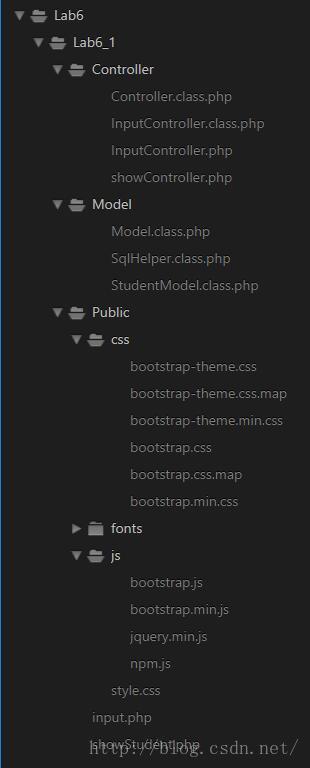
目录结构如下:
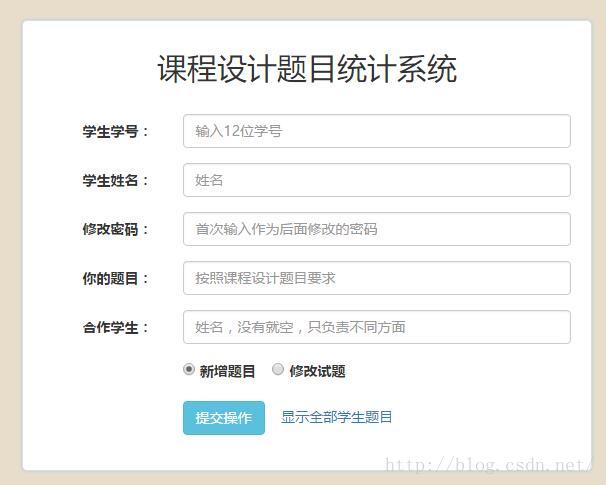
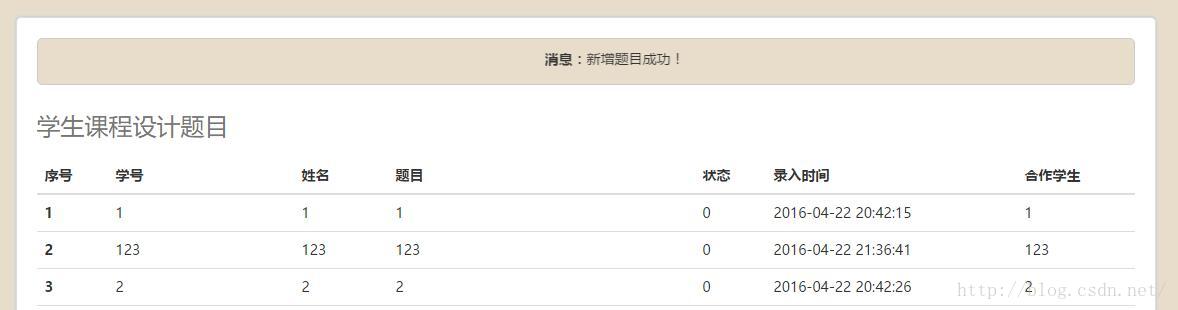
实验运行结果:
input.php
<!DOCTYPE html>
<html lang="zh-CN">
  <head>
    <meta charset="utf-8">
    <meta http-equiv="X-UA-Compatible" content="IE=edge">
    <meta name="viewport" content="width=device-width, initial-scale=1">
    <!-- 上述3个meta标签*必须*放在最前面,任何其他内容都*必须*跟随其后! -->
    <title>课程设计题目统计系统</title>

    <!-- Bootstrap -->
    <link href="/Lab6/Lab6_1/Public/css/bootstrap.min.css" rel="stylesheet">
    <link href="/Lab6/Lab6_1/Public/style.css" rel="stylesheet" type="text/css"/>

    <!-- HTML5 shim and Respond.js for IE8 support of HTML5 elements and media queries -->
    <!-- WARNING: Respond.js doesn"t work if you view the page via file:// -->
    <!--[if lt IE 9]>
      <script src="//cdn.bootcss.com/html5shiv/3.7.2/html5shiv.min.js"></script>
      <script src="//cdn.bootcss.com/respond.js/1.4.2/respond.min.js"></script>
    <![endif]-->
  </head>
  <body>
    <div class="container">
      <div class="col-sm-3"></div>
      <div class="col-sm-6 content">
        <h2>课程设计题目统计系统</h2>
        <form class="form-horizontal" action="Controller/InputController.php" method="POST">
          <div class="form-group">
            <label for="number" class="col-sm-3 control-label">学生学号:</label>
            <div class="col-sm-9">
              <input type="text" class="form-control" id="number" placeholder="输入12位学号" name="sno">
            </div>
          </div>
          <div class="form-group">
            <label for="name" class="col-sm-3 control-label">学生姓名:</label>
            <div class="col-sm-9">
              <input type="text" class="form-control" id="name" placeholder="姓名" name="name">
            </div>
          </div>
          <div class="form-group">
            <label for="password" class="col-sm-3 control-label">修改密码:</label>
            <div class="col-sm-9">
              <input type="password" class="form-control" id="password" placeholder="首次输入作为后面修改的密码" name="psw">
            </div>
          </div>
          <div class="form-group">
            <label for="title" class="col-sm-3 control-label">你的题目:</label>
            <div class="col-sm-9">
              <input type="text" class="form-control" id="title" placeholder="按照课程设计题目要求" name="title">
            </div>
          </div>
          <div class="form-group">
            <label for="name" class="col-sm-3 control-label">合作学生:</label>
            <div class="col-sm-9">
              <input type="text" class="form-control" id="name" placeholder="姓名,没有就空,只负责不同方面" name="partner">
            </div>
          </div>
          <div class="form-group">
            <div class="col-sm-offset-3 col-sm-9">
                <label>
                  <input type="radio" name="action" value="add"  checked="checked"> 新增题目
                </label>

                <label>
                  <input type="radio" name="action" value="modify"> 修改试题
                </label>
            </div>
          </div>
          <div class="form-group">
            <div class="col-sm-offset-3 col-sm-9">
              <button type="submit" class="btn btn-info">提交操作</button>
              <a href="Controller/showController.php">显示全部学生题目</a>
            </div>
          </div>
          <?php
            $err = array("sno"=>"学生学号不能为空!", "name"=>"学生姓名不能为空!", "psw"=>"修改密码不能为空", "title"=>"题目标题不能为空!", "add"=>"新增题目失败,原因可能为已新增过题目了,请尝试选择“修改试题”进行提交!", "modify"=>"修改试题失败,原因可能为:1.未新增过题目;2.学生学号输入错误;3.修改密码输入错误!");
            if($_GET["err"]) {
          ?>
               <p class="info"><span style="font-weight: bold">错误:</span><?php echo $err[$_GET["err"]];?></p>
          <?php
            }
          ?>
        </form>
      </div>
      <div class="col-sm-3"></div>
    </div>

    <!-- jQuery (necessary for Bootstrap"s JavaScript plugins) -->
    <script src="/Lab6/Lab6_1/Public/js/jquery.min.js"></script>
    <!-- Include all compiled plugins (below), or include individual files as needed -->
    <script src="/Lab6/Lab6_1/Public/js/bootstrap.min.js"></script>
  </body>
</html>
showStudent.php
<!DOCTYPE html>
<html lang="zh-CN">
  <head>
    <meta charset="utf-8">
    <meta http-equiv="X-UA-Compatible" content="IE=edge">
    <meta name="viewport" content="width=device-width, initial-scale=1">
    <!-- 上述3个meta标签*必须*放在最前面,任何其他内容都*必须*跟随其后! -->
    <title>课程设计题目统计系统</title>

    <!-- Bootstrap -->
    <link href="/Lab6/Lab6_1/Public/css/bootstrap.min.css" rel="stylesheet">
    <link href="/Lab6/Lab6_1/Public/style.css" rel="stylesheet" type="text/css"/>
    <style>
      p.info {
        margin-bottom: 0;
      }
    </style>

    <!-- HTML5 shim and Respond.js for IE8 support of HTML5 elements and media queries -->
    <!-- WARNING: Respond.js doesn"t work if you view the page via file:// -->
    <!--[if lt IE 9]>
      <script src="//cdn.bootcss.com/html5shiv/3.7.2/html5shiv.min.js"></script>
      <script src="//cdn.bootcss.com/respond.js/1.4.2/respond.min.js"></script>
    <![endif]-->
  </head>
  <body>
	<div class="container">
      <div class="content">
        <?php
          if($info) {
            if($info == "add") {
              $fo = "新增";
            } else if($info == "modify") {
              $fo = "修改";
            }
        ?>
             <p class="info"><marquee behavior="scroll" direction="left"><span style="font-weight: bold">消息:</span><?php echo $fo . "题目成功!";?></marquee></p>
        <?php
          }
        ?>

        <table class="table table-hover">
          <caption><h3>学生课程设计题目</h3></caption>
          <?php
            if(!isset($res) || empty($res)) {
              echo "<tr><td>暂无学生题目</td></tr>";
            } else {
          ?>
          <thead>
            <tr>
              <!-- <th>删除</th> -->
              <th>序号</th>
              <th>学号</th>
              <th>姓名</th>
              <th>题目</th>
              <th>状态</th>
              <th>录入时间</th>
              <th>合作学生</th>
            </tr>
          </thead>
          <tbody>
            <?php
              $i = $start ? $start : 1;
              foreach ($res as $value) {
                echo "<tr>";
                echo "<th scope="row">$i</th>";
                echo "<td>{$value["sno"]}</td>";
                echo "<td>{$value["name"]}</td>";
                echo "<td>{$value["title"]}</td>";
                echo "<td>{$value["state"]}</td>";
                echo "<td>{$value["last_time"]}</td>";
                echo "<td>{$value["partner"]}</td>";
                echo "</tr>";
                $i++;
              }
            ?>
          </tbody>
          <?php
            }
          ?>
        </table>
        <nav>
          <ul class="pager">
            <li>
              <?php
                if($prePage) {
                  if($prePage >= 1) {
                    echo "<a href="showController.php?cur=$prePage">上一页</a>";
                  }
                }
              ?>
            </li>
            <li>
              <?php
                if($nextPage) {
                  if($nextPage >= 1) {
                    echo "<a href="showController.php?cur=$nextPage">下一页</a>";
                  }
                }
              ?>
            </li>
          </ul>
        </nav>
        <a href="/Lab6/Lab6_1/input.php">返回输入界面</a>
      </div>
    </div>

    <!-- jQuery (necessary for Bootstrap"s JavaScript plugins) -->
    <script src="/Lab6/Lab6_1/Public/js/jquery.min.js"></script>
    <!-- Include all compiled plugins (below), or include individual files as needed -->
    <script src="/Lab6/Lab6_1/Public/js/bootstrap.min.js"></script>
  </body>
</html>
style.css
body {
  font-family: "微软雅黑", "Microsoft YaHei";
  background-color: #E8DDCB;
}
.content {
  border: 1px solid #DDD;
  border-radius: 5px;
  box-shadow: 0 0 5px #ABCEDF;
  padding: 0 20px 20px;
  background-color: #FFF;

  margin: 50px 0;
  filter:alpha(opacity=100);  /* ie 有效*/
  -moz-opacity: 1; /* Firefox  有效*/
  opacity: 1; /* 通用,其他浏览器  有效*/

  animation: contentAnim 1s;
  -moz-animation: contentAnim 1s; /* Firefox */
  -webkit-animation: contentAnim 1s;  /* Safari 和 Chrome */
  -o-animation: contentAnim 1s; /* Opera */
}
.content h2 {
  text-align: center;
  margin: 30px 0;
}

@keyframes contentAnim {
  from {margin-top: 300px; filter:alpha(opacity=0); -moz-opacity: 0; opacity: 0;}
  to {margin-top: 50px; filter:alpha(opacity=100); -moz-opacity: 1; opacity: 1;}
}

@-moz-keyframes contentAnim { /* Firefox */
  from {margin-top: 300px; filter:alpha(opacity=0); -moz-opacity: 0; opacity: 0;}
  to {margin-top: 50px; filter:alpha(opacity=100); -moz-opacity: 1; opacity: 1;}
}

@-webkit-keyframes contentAnim { /* Safari 和 Chrome */
  from {margin-top: 300px; filter:alpha(opacity=0); -moz-opacity: 0; opacity: 0;}
  to {margin-top: 50px; filter:alpha(opacity=100); -moz-opacity: 1; opacity: 1;}
}

@-o-keyframes contentAnim { /* Opera */
  from {margin-top: 300px; filter:alpha(opacity=0); -moz-opacity: 0; opacity: 0;}
  to {margin-top: 50px; filter:alpha(opacity=100); -moz-opacity: 1; opacity: 1;}
}

p.info {
  margin: 20px 0;
  padding: 10px 30px;
  background-color: #E8DDCB;
  border: 1px solid #CCC;
  border-radius: 5px;
}
基本控制器类Controller.class.php 和 基本模型类 Model.class.php 在上面已经列出。
InputController.class.php
<?php
	require_once "Controller.class.php";
	require_once "../Model/StudentModel.class.php";

	class InputController extends Controller {
		protected $required = array("sno"=>"学生学号不能为空!", "name"=>"学生姓名不能为空!", "psw"=>"修改密码不能为空", "title"=>"题目标题不能为空!");

		function check() {
			foreach ($this->required as $key => $value) {
				if(!$this->validate($_POST[$key])) {
					$this->redirect("input.php?err=" . $key);
				}
			}
		}

		function doAction() {
			if($this->validate($_POST["action"])) {
				if($_POST["action"] == "add") {
					$this->add();
				} else {
					$this->modify();
				}
			}
		}

		function add() {
			$studentModel = new StudentModel();
			if($studentModel->add()) {
				$this->assign("info", "add")->show();
			} else {
				$this->redirect("input.php?err=add");
			}
		}

		function modify() {
			//echo "modify";
			$studentModel = new StudentModel();
			if($studentModel->modify()) {
				$this->assign("info", "modify")->show();
			} else {
				$this->redirect("input.php?err=modify");
			}
		}

		function show() {
			$studentModel = new StudentModel();
			$cur = 1; //当前页数第一页
			if($this->validate($_GET["cur"])) {
				$cur = $_GET["cur"];
			}
			$res = $studentModel->page($cur);
			$this->assign("res", $res)->assign("start", ($cur-1) * $studentModel->getEachPageLen() + 1)->assign("prePage", $cur-1)->assign("nextPage", $cur+1)->display("showStudent.php");
		}
	}
?>
inputController.php
<?php
	require_once "InputController.class.php";

	$inputC = new InputController();
	$inputC->check();
	$inputC->doAction();
?>
showController.php
<?php
	require_once "InputController.class.php";

	$inputC = new InputController();
	$inputC->show();
?>
<?php
	require_once "Model.class.php";

	class StudentModel extends Model {
		private $eachPageLen = 15;

		//新增数据
		function add() {
			$sno = $_POST["sno"];
			$name = $_POST["name"];
			$psw = $_POST["psw"];
			$title = $_POST["title"];
			$partner = $_POST["partner"];

			$sql = "INSERT INTO students(`sno`, `name`, `psw`, `title`, `last_time`, `partner`) VALUES("$sno", "$name", "$psw", "$title", now(), "$partner")";

			$res = $this->execute_dml($sql);
			if($res == 1) {
				return 1; //新增题目成功
			} else {
				return 0; //新增题目失败
			}
		}

		//修改数据
		function modify() {
			$sno = $_POST["sno"];
			$psw = $_POST["psw"];
			$title = $_POST["title"];
			$partner = !isset($_POST["partner"]) || empty($_POST["partner"]) ? "" : $_POST["partner"];

			$sql = "UPDATE students SET `title` = "$title", `partner` = "$partner" WHERE `sno` = "$sno" AND `psw` = "$psw"";

			$res = $this->execute_dml($sql);
			if($res == 1) {
				return 1; //修改题目成功
			} else {
				return 0; //修改题目失败
			}
		}

		//分页查询数据
		function page($cur) {
			$length = $this->eachPageLen;
			$offset = ($cur - 1) * $length;
			$sql = "SELECT * FROM students ORDER BY sno LIMIT $offset,$length";
			return $arr = $this->execute_dql_arr($sql);
		}
		//得到每页的页数
		function getEachPageLen() {
			return $this->eachPageLen;
		}
	}
?>
- 上一篇: PHP操作mysql类的封装
- 下一篇:没有了
