
vue嵌套路由-query传递参数(三)
在嵌套路由中我们经常会遇到父路由向子路由里面传递参数,传递参数有两种方法,通过 query 或者 params
index.html
<div id="app">
	<!-- router-view 路由出口, 路由匹配到的组件将渲染在这里 -->
	<router-view></router-view>
</div>
main.js 同样通过重定向来显示父路由
import Vue from "vue"
import VueRouter from "vue-router"
Vue.use(VueRouter)

//引入两个组件
import home from "./home.vue"
import game from "./game.vue"
//定义路由
const routes = [
	{ path: "/", redirect: "/home" },//重定向
	{
		path: "/home", component: home,
		children: [
			{ path: "/home/game", component: game }
		]
	}
]
//创建路由实例
const router = new VueRouter({routes})

new Vue({
	el: "#app",
	data: {
		id:123,
	},
	methods: {

	},
	router
})
home.vue 通过query来传递num参数为1,相当与在 url 地址后面拼接参数
<template>
	<div>
		<h3>首页</h3>
		<router-link :to="{ path:"/home/game", query: { num:  1} }">
			<button>显示<tton>
		</router-link>

		<router-view></router-view>
	</div>
</template>
game.vue 子路由中通过 this.$route.query.num 来显示传递过来的参数
	<template>
		<h3>王者荣耀{{ this.$route.query.num }}</h3>
	</template>
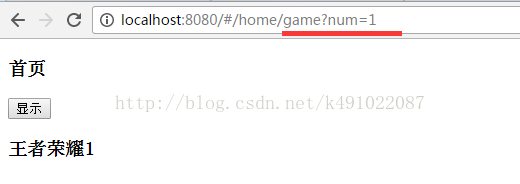
运行后的结果,传递的参数在地址栏中有显示
声明:该文观点仅代表作者本人,入门客AI创业平台信息发布平台仅提供信息存储空间服务,如有疑问请联系rumenke@qq.com。
